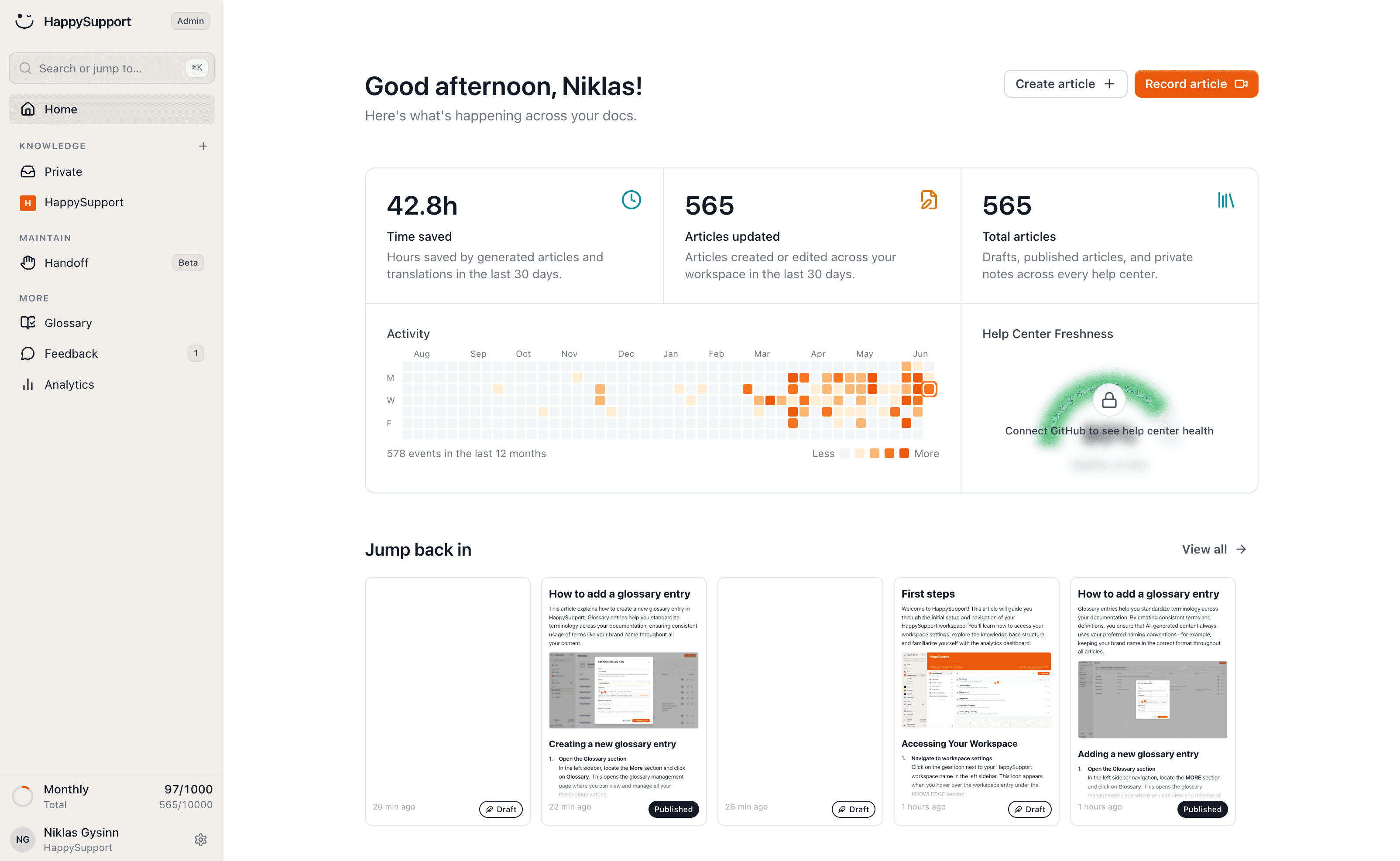
The Confluence alternative built for your customers

Confluence is a wiki your team writes into. A help center is what your customers read. HappySupport is built for that second job: it writes, updates and translates your articles itself, and nobody needs a licence to read them. Enter the address of your public docs and we'll bring everything across.
HappySupport vs Confluence: the short answer
Confluence is an internal wiki that can be made public, priced per user. HappySupport is built as a customer help center: articles are created from a recording, translate themselves and are updated after every release, with your own domain and SEO, at a flat price. For internal docs around Jira Confluence stays strong; for customer docs HappySupport fits better.
 Niklas GysinnFounder and CEO, HappySupport · ·
 These teams document with HappySupport



How do you write an article without an empty editor?
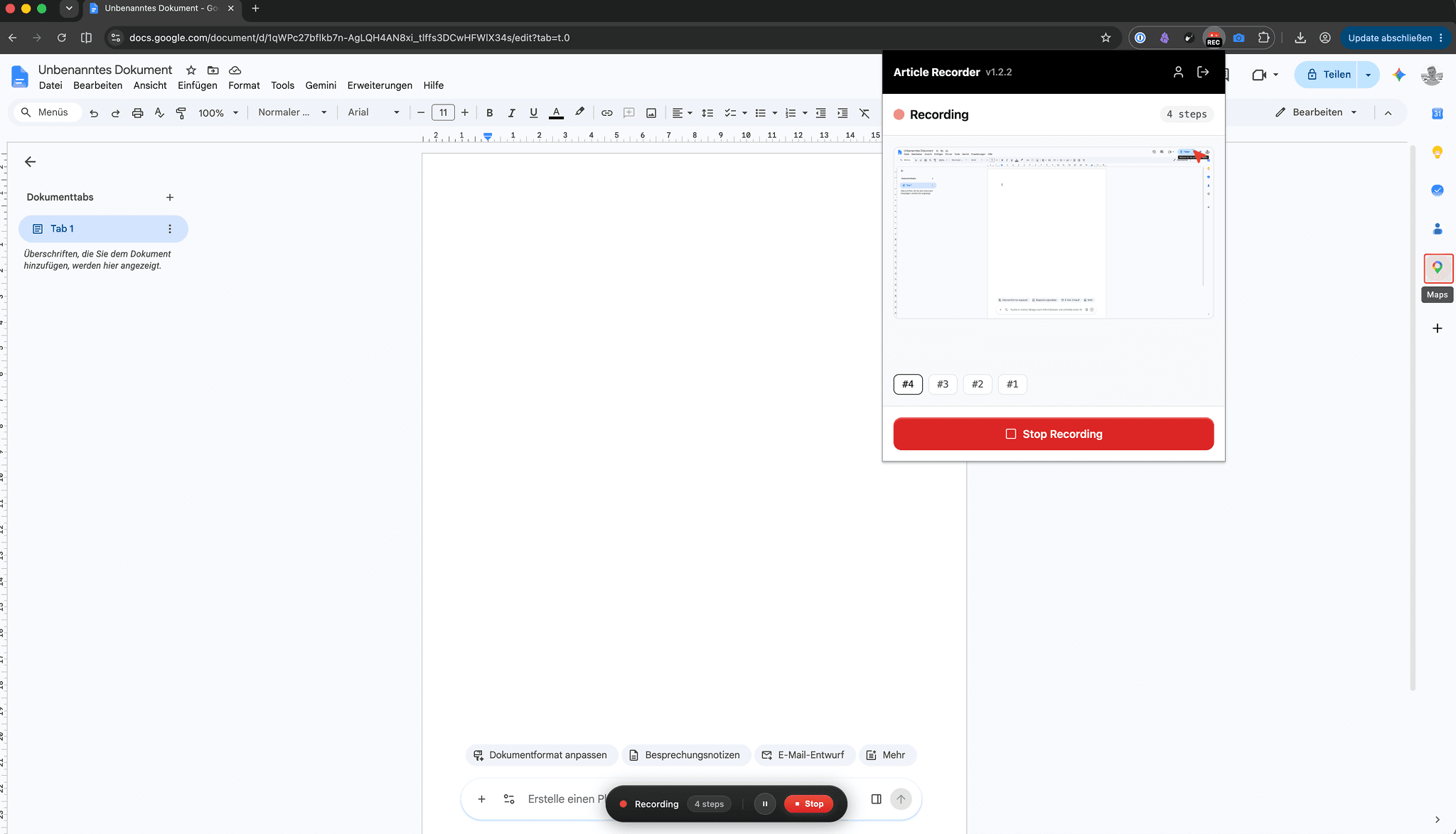
You click through the flow once and the recorder turns it into the finished article: every click becomes a step with a labelled screenshot, and what you say along the way becomes the text.
In Confluence a help article is a wiki page: you write every step, paste every screenshot and rebuild the macros whenever the template changes.
Half an hour of wiki gardening per guide becomes two minutes.
How do the docs stay current when the product changes?
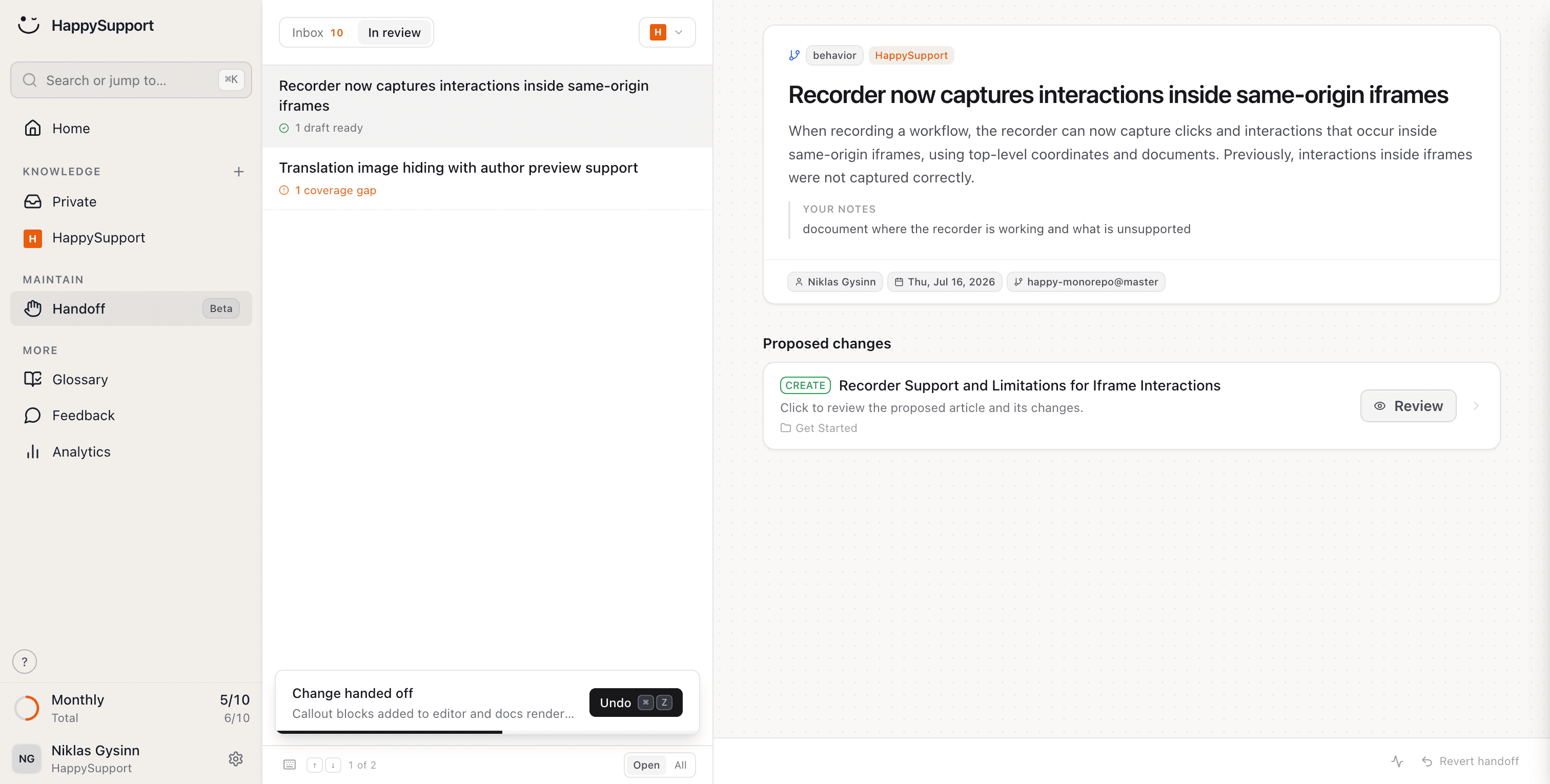
After every release HappySupport reads the changes in your repository, finds the articles they affect and hands you finished text edits to review.
A wiki does not know what your product looks like. When a release changes a flow, the page describing it stays exactly as it was, and nobody notices until a customer does.
You review and approve. HappySupport does the rest.
What does your team stop doing after leaving Confluence?
Writing articles, updating them after releases, translating and checking them: HappySupport takes on these eight jobs. Confluence gives your team a place to write. We take on the writing, and nobody needs a licence to read.
Create articles just by clicking
Click through the flow once. Out comes a finished article with annotated screenshots, instead of half an hour of wiki editing per guide.
AI article recorderYour docs stay current when your product changes
Handoff spots what changed in the product and proposes updates for exactly the articles it affects. No page quietly describing last quarter's UI.
Documentation from code changesCreate articles from what's in your code
Connect your repository and article drafts come out of what your team already wrote. The source of truth is the code, not a wiki page.
AI documentation agentEvery article uses the same terms
Terms are agreed once and enforced across every article. A wiki lets every author name things their own way; here the naming is settled once.
Your help center checks itself
46 checks across six categories run continuously: dead links, stale articles, missing images, structure, SEO. The gardening nobody on the wiki ever got around to, done for you.
Documentation auditYour articles translate themselves
New languages appear automatically and stay current. Change the original and the translations follow, instead of living on as sibling pages nobody keeps aligned.
Multilingual knowledge baseCustomers find answers without the exact words
Semantic search finds the right article even when nobody remembers the exact heading. Customers should not have to guess the page title someone picked two years ago.
AI chatbot for customer serviceShare a single article by link
Every article has a link you can hand over mid-conversation, and the person who opens it does not need a licence.
AI help centerWhat is the difference between Confluence and HappySupport?
Confluence is a wiki for internal teams with a public mode; HappySupport is built as a customer help center and maintains the articles itself. Only the points where the two actually differ as a customer-facing help center are listed here.
| Feature | HappySupport | Confluence |
|---|---|---|
| Built as a customer-facing help center | Internal wiki with a public mode | |
| Team access without per-user licences | Every internal user needs a licence | |
| Create articles from a screen recording | ||
| Detect affected articles after a release | ||
| SEO-ready public pages | Public spaces yes, public links not indexed | |
| AI answers grounded in your own articles | From Professional, included in the plan | Rovo, billed in credits |
| Automatic translation, kept in sync | Marketplace apps only | |
| Continuous health check with auto-fix | 46 checks, 6 categories | |
| Pricing | Per plan | Per user, $5.42 to $10.44 a month |
| Custom domain for the help center | From Professional | From Premium |

Ready to switch? Enter the address of your public Confluence docs and we'll take it from there.
As of September 2026, checked against Atlassian's pricing and support pages (sources at the end of this page). Features and prices depend on plan and marketplace apps; this compares Confluence Cloud used as a customer-facing help center.
What do independent numbers say about Confluence?
Confluence is the default wiki for many tech teams and well rated. The numbers below show what it costs as a public help center and what self-service delivers overall.
4.5/5
Capterra rating for Confluence across 3,720 reviews. A common complaint: search surfaces old pages instead of current ones.
$10.44
per user per month for Premium, the first Confluence plan with a custom domain. Standard costs $5.42.
Dec 3, 2026
From this date Atlassian bills Rovo credits beyond the allowance. Standard includes 25 credits per user per month.
14%
of customer service issues are fully resolved in self-service, according to a Gartner survey of 5,728 customers.
What does Confluence say, and what is our answer?
Confluence's strongest arguments are on its own pages, and some of them hold. Here is each one with its source and our answer to it.
Confluence says
“The AI workspace that works with you.”
Our answer
Rovo is strong for internal search across Jira and Confluence. For customer questions what matters is whether the page is right, and a wiki does not notice when a release changes a flow. Rovo also runs on credits that cost extra beyond the allowance from December 2026. HappySupport answers from your articles, with a fixed allowance in the plan.
Confluence says
“Confluence knowledge base software keeps content organized, accessible, and easy to manage for internal teams and external customers.”
Our answer
Public works, with limits: anonymous access only on paid plans and only for the whole site, a custom domain only from Premium, and public links are not indexed by search engines. HappySupport is built as a customer help center, with your own domain, SEO and redirects.
Confluence says
“Connect seamlessly with Jira Service Management to provide centralized self-service support across your enterprise.”
Our answer
If your support runs in Jira Service Management, that is a real argument. The connection does not make articles right after a release, though. HappySupport reads your code in GitHub for that, and you can keep Confluence for internal docs.
Confluence says
“Offer knowledge base articles in multiple languages.”
Our answer
Multiple languages are possible, but Atlassian says there is no built-in automatic translation of page content; that needs marketplace apps. HappySupport translates automatically and updates translations when the original changes.
How long does moving from Confluence take?
The import itself takes minutes: you enter your help center's address and the articles, images, structure and redirects come across. Public Confluence docs are years of shared links, screenshots and cross-references. Moving them into a real help center leaves none of it behind.
Shared links keep working
Every old address gets a redirect automatically. Bookmarks, links in old tickets and Google results still land on the right article, so your SEO moves with you.
Internal references stay intact
Cross-references between your pages are detected and relinked as article links. No dead links between articles that used to cite each other.
Every image comes across
Screenshots and graphics are brought over in full and hosted by us. Nothing to re-upload, and nothing left hanging off Confluence afterwards.
Your page tree becomes navigation
Spaces and page hierarchies come across as categories and folders your customers can actually browse, with search on top.
“We hired 2.5 full-time people just to build and maintain our help center. HappySupport would have saved us over €5,000/month.”
 Fabian SilbererCo-Founder of sevDesk and investor in HappySupport
What do teams ask before leaving Confluence?
The questions teams ask us before a migration.
Can I import my existing Confluence docs?+
Yes, if they are public: enter the address and we bring across articles, images and structure. For internal-only spaces, start with the content that should face customers; the recorder rebuilds a guide in minutes.
Do we have to give up Confluence completely?+
No. Confluence is a fine internal wiki, especially next to Jira. What it was not built for is the customer-facing help center: public SEO, readers without licences, and docs that follow the product. Many teams keep Confluence internally and run HappySupport as the customer layer.
What do Confluence licences mean for a help center?+
Everyone who maintains content in Confluence needs a paid seat, and guest access is capped, so the bill grows with every hire. HappySupport is priced per plan: the whole team works on the help center and the invoice stays the same.
What happens to links our customers have already shared?+
Every old Confluence page address gets a redirect automatically during the import. Bookmarks, links in old tickets and Google results still land on the right article, so your rankings move with you.
Where is our data hosted?+
In the EU, by default and at no extra cost. For teams with GDPR requirements this is often the deciding argument.
How does HappySupport compare to Confluence on price?+
Current plans are on our pricing page, priced per plan rather than per user. Confluence lists roughly 5 to 11 USD per user per month depending on tier, so the comparison depends mostly on how many people need access.
About the author
 Niklas GysinnFounder and CEO, HappySupport
Niklas Gysinn founded HappySupport in Stuttgart in 2025 and runs the company from Heilbronn today. He works on the product himself and talks directly with the teams moving their help center over from Zendesk, Intercom, Confluence and other tools. These comparisons come out of those conversations and out of the vendors' public pricing and help pages.
Sources
HappySupport competes with Confluence, so this page is not neutral. That is why every number and every quote carries its source. Prices and ratings change; check them with the vendor before you decide.
- Atlassian, Confluence pricing (accessed September 2026)
- Atlassian, Confluence homepage (accessed September 2026)
- Atlassian, Confluence as a knowledge base (accessed September 2026)
- Atlassian Support, Rovo usage limits (accessed September 2026)
- Atlassian Support, how secure are public links (accessed September 2026)
- Atlassian Support, make a space public (accessed September 2026)
- Atlassian Support, add a custom domain (accessed September 2026)
- Atlassian Support, translating Confluence page content (accessed September 2026)
- Capterra, Confluence reviews (accessed September 2026)
- Gartner, survey: only 14% of customer service issues are fully resolved in self-service (August 2024)
Your help center, ready before your coffee.
Start for free and publish your first article today.