HappySupport
Code to docs

Every release becomes current docs

HappySupport Git Handoff reads every merge in your repository and says in one sentence what changes for your users. So you see right away which help articles are no longer true, with the finished draft next to them. You check the marked passages and apply them in one click.

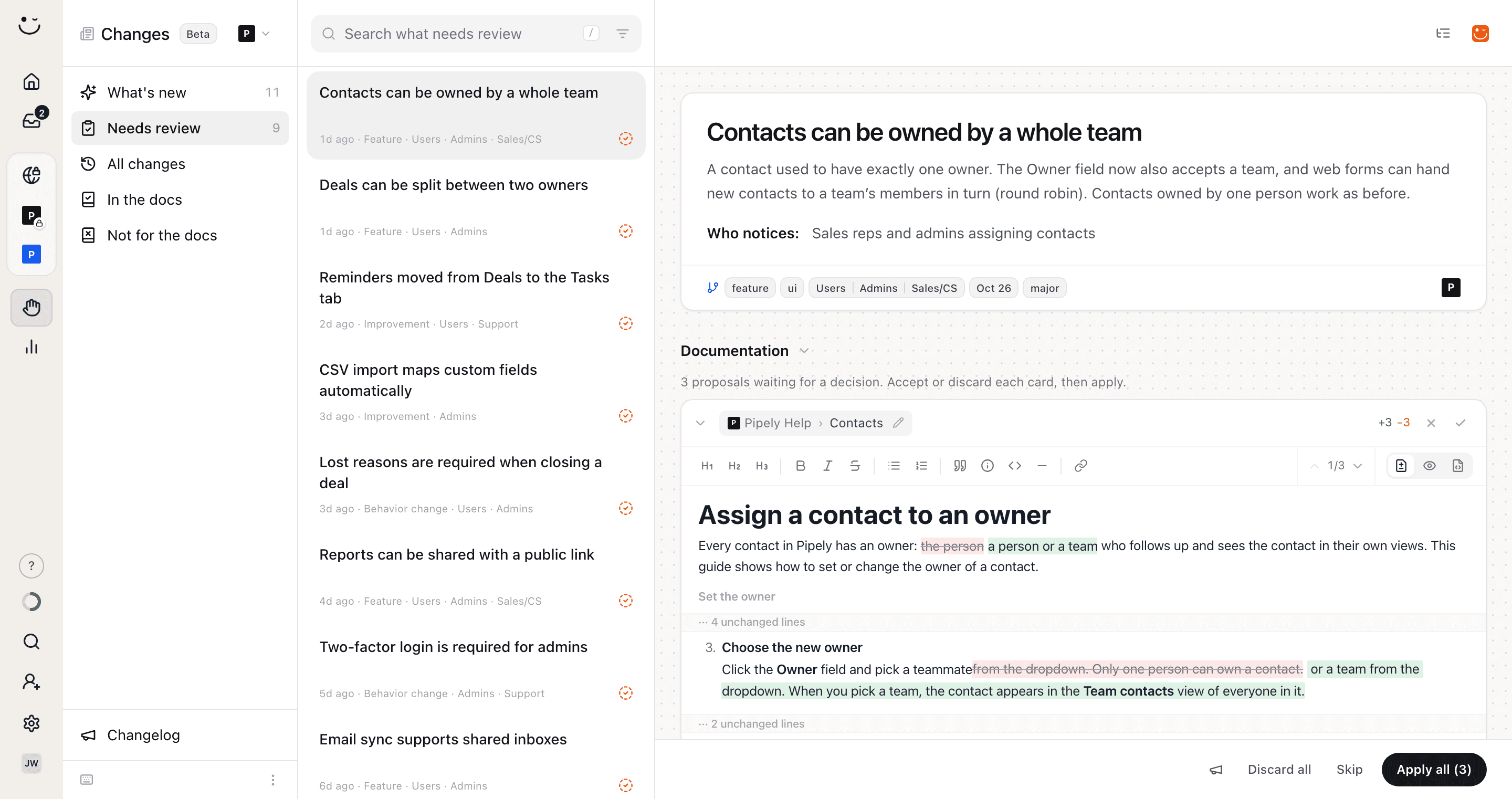
The Changes area in HappySupport for Pipely, a sales tool: nine product changes waiting for review on the left. On the right, the change "Contacts can be owned by a whole team" with the expanded draft for the article "Assign a contact to an owner": the old sentence in step 3 struck through, the new text about team owners marked green, and the "Apply all (3)" button below
In short

What HappySupport Git Handoff does

Git Handoff is the part of HappySupport that keeps your docs in line with your code. It reads the commits and merged pull requests in your GitHub or GitLab repository, groups them into product changes and checks which help articles each change affects. For every affected article HappySupport writes a draft that changes only the wrong passages, and for missing topics it writes a new article. Nothing goes live until someone on your team applies it.

Git Handoff is included in HappySupport from Professional at 399 euros a month billed yearly (479 euros billed monthly), excl. VAT, flat rather than per seat. You can try every plan free for 14 days without a credit card.

These teams document with HappySupport

FlipjupusPeakboardaworkneuroflashOMR Reviews
How it works

From a merge to an updated article

Nobody has to remember which article needs an edit after which release. HappySupport follows what your team ships and hands you the work ready to review.

Pull request #482 merged into main
  • a41c9e2feat(contacts): allow a team as owner
  • 7d02b18feat(forms): round robin for team owners
  • c93f5aachore(deps): bump eslint to 9.4ignored

1. Connect your repository

You connect GitHub or GitLab with an access token and pick the branch that goes live. HappySupport creates the webhook itself, so every push and merged pull request is read without anything else to set up. Refactors, tests and dependency bumps are filtered out, so you only see changes your users will notice.

A change in the Changes area: the title "Contacts can be owned by a whole team", a plain-language summary, the "Who notices" line and tags marking it a feature for Users, Admins and Sales

2. Understand the change

The commits become a product change in plain language: what changed, who notices and which role it matters to. When several pull requests belong to the same feature, HappySupport groups them into one change. So your support team understands what shipped without reading code.

The "Publish or keep as draft" dialog in HappySupport: one new article set to Draft, and two edits to published articles that go live directly

3. Review and apply the drafts

Every change comes with drafts for all the articles it affects. "Apply all" takes them in one go, and for new articles you choose whether they publish right away or wait as drafts. That way the docs are current on release day, not weeks later.

Targeted drafts

Only the sentences that stopped being true

HappySupport does not rewrite affected articles. The draft anchors each edit to the passage the code made wrong and leaves the rest alone. So you review three marked sentences instead of a whole article.

Try it with your repository
The expanded draft for the Pipely article "Assign a contact to an owner": three passages changed, removed text in red and new text in green, the rest of the article folded away as unchanged lines
  1. Every edit in its place

    Removed and new text sit right in the article, and unchanged sections are folded. The arrows jump from edit to edit, and you can drop a single edit without losing the rest.

  2. A second model checks the work

    Before you see a draft, a second AI model checks every edit against the code change. Whatever it cannot back up is removed or flagged for you. So fewer guesses end up in your docs.

  3. Fix it in the draft

    The draft is a normal editor. Change a word, add a note, or tell HappySupport what should be different and get a new draft. The article is only written when you apply it.

On every change

More than article updates

Not every change fits an existing article, and not every change needs docs. HappySupport covers those cases too, so nothing is left lying around.

A gap "Set up lost reasons for your deals" with the Write button, a draft for "Close a deal as won or lost", and the suggestion "Report on why deals are lost" under "Could also be written"

Missing articles and ideas

When HappySupport finds no article a new feature belongs in, it marks it "Needs a home". "Write" researches the code and writes a new article, "Record" lets you record the flow yourself. Below it are more articles that would suit the change, as suggestions to write or dismiss.

The menu "No docs for this, because it is…" with the reasons Bug fix, Nothing a reader sees, Already covered, Too small, Another product and Not a product change

Skip with a reason

When a change needs no docs, click "Skip" and pick the reason, such as a bug fix or already covered. The change leaves your list, and your team can see why later.

NewOctober 26

Contacts can belong to a whole team

Pick a team in the Owner field, and new contacts from web forms go to its members in turn.

A changelog from the same change

The megaphone in the bar turns the change into a changelog entry. HappySupport writes the draft, and you publish it in the help center, in the widget and as an RSS feed, translated automatically.

HappySupportMon, 09:00

What changed in Pipely: week 44

11 changes, 9 of them with docs drafts

HappySupportTue, 09:30

3 drafts waiting for review in Pipely

Nothing reaches the help center until you apply it.

An email when drafts are waiting

On Mondays one email sums up what shipped last week. On weekdays a second email reminds you when drafts are waiting for review. You turn both on in the Changes area, so you never have to check daily whether there is work.

Where it reads from

GitHub and GitLab

You connect your repository with a personal access token. HappySupport creates the webhook and then reads every push and merged pull request on the branch you choose.

GitHub

For repositories on github.com. The token needs the Contents and Webhooks permissions. That lets HappySupport read the code and create the webhook itself, without you setting anything up in the repository settings.

Connect

GitLab

For projects on gitlab.com. The token needs the read_repository and api scopes. Pushes and merge requests arrive through the webhook, so changes show up under Changes as soon as they are merged.

Connect

Bitbucket

Planned

Bitbucket repositories can already be connected, but Git Handoff does not read their commits yet. Until then, use GitHub or GitLab.

Join the waitlist
After you apply

One update, current everywhere

An applied draft is a normal HappySupport article. So everything built on your articles picks up the new version automatically.

Translations follow

As soon as you apply an update, HappySupport translates the article again into your help center's languages. So international customers read the new guide on the same day.

The AI chatbot answers correctly

The AI chatbot in the help center and the widget answers from your articles. When the articles are current, so are its answers, and it stops explaining last release's flow.

A public changelog

Changes you mark with the megaphone appear on your help center's changelog page, in the widget's changelog tab and in the RSS feed. You turn the changelog on per help center.

Record new flows

When a new article needs screenshots, "Record" starts the HappySupport Recorder. The recording lands straight in the article Git Handoff suggested.

For your AI assistant too

Through the HappySupport MCP server, an assistant such as Claude reads the open changes and their topics. So you can ask in chat what shipped last week and which articles are still open.

Your team knows what is live

The plain-language descriptions help support and sales too. Whoever subscribes to the weekly email knows what changed before the first customer asks about it.

Control

You decide what goes live

HappySupport proposes, your team decides. These rules hold for every change.

Nothing without your approval

Drafts stay drafts until someone with admin rights applies them. New articles start as drafts unless you switch them to Publish when applying.

No noise from the code

Refactors, tests, formatting and dependency bumps create no change. A revert cancels the change it reverts, so the list stays short.

Feature flags recognised

When a feature sits behind a feature flag, the change says so. You know it is merged but maybe not visible to everyone yet, and can hold off on publishing.

Several help centers

When you link a branch to several help centers, the change is described once and checked separately for each help center. Each one has its own drafts and its own status.

The last 30 days right away

After you connect, HappySupport pulls 90 days of history and analyzes the last 30 days. So on day one you see what your docs have missed since last month.

Access you can take back

The token is stored encrypted. When you remove the repository, HappySupport also deletes its local copy of the code.

Read on

Docs that grow with your product

Git Handoff is one part of it. These pages show the rest.

FAQ

HappySupport Git Handoff in detail

Which repositories, which permissions, what it costs and what never happens without you.

Is there a free version of HappySupport with Git Handoff?+

No, HappySupport has no free plan, including for the helpdesk. Git Handoff is included from Professional at 399 euros a month and in Scale at 899 euros, billed yearly (479 or 1,079 euros billed monthly), excl. VAT, flat rather than per seat. You can try every plan free for 14 days without a credit card, and test Git Handoff with your own repository during that time.

Which Git providers does HappySupport Git Handoff support?+

GitHub and GitLab, in their cloud versions on github.com and gitlab.com. Bitbucket repositories can be connected, but Git Handoff does not read their commits yet. Self-hosted GitLab instances are not supported at the moment.

Which permissions does HappySupport need on my repository?+

You connect the repository with a personal access token. On GitHub it needs the Contents and Webhooks permissions, on GitLab the read_repository and api scopes. HappySupport needs the webhook permission to create the webhook itself. It writes nothing to your code, and the token is stored encrypted.

When does HappySupport check my commits?+

Right after every push and merged pull request, through the webhook. HappySupport also pulls new commits every night at 3:00 UTC, and you can refresh in the Changes area at any time. Changes from the last 30 days are analyzed, older ones are not.

Does HappySupport publish changes to my docs automatically?+

No. HappySupport writes the drafts automatically, but they are only applied when someone with admin rights clicks "Apply all". For new articles you choose whether they publish or wait as drafts, and Draft is the default. Edits to articles that are already published go live when you apply them.

Does HappySupport read only the diffs or my whole code?+

Both. The analysis reads the commit diffs. For drafts and new articles HappySupport reads more files from a copy of your repository when needed, for example to look up a button label or a setting. The copy is deleted when you remove the repository or the provider.

How does HappySupport tell that a change needs no docs?+

Refactors, tests, formatting and dependency bumps are filtered out before an AI reads them. For the remaining changes HappySupport checks whether an article becomes wrong and has to quote the affected passage. If it cannot, the article is not edited. Anything that still lands in your list you skip with a reason.

Does HappySupport turn code changes into release notes?+

Yes. The megaphone turns a change into a changelog entry that HappySupport drafts. Once published it appears on your help center's changelog page, in the widget's changelog tab and in the RSS feed, translated automatically.

Does Git Handoff update screenshots too?+

No, Git Handoff changes the text of your articles. For new flows you start the HappySupport Recorder from the suggestion. On Professional and Scale, HappySupport re-captures single screenshots in a cloud browser; that feature is in beta and runs separately from Git Handoff.

Your help center, ready before your coffee.

Start for free and publish your first article today.

HappySupport