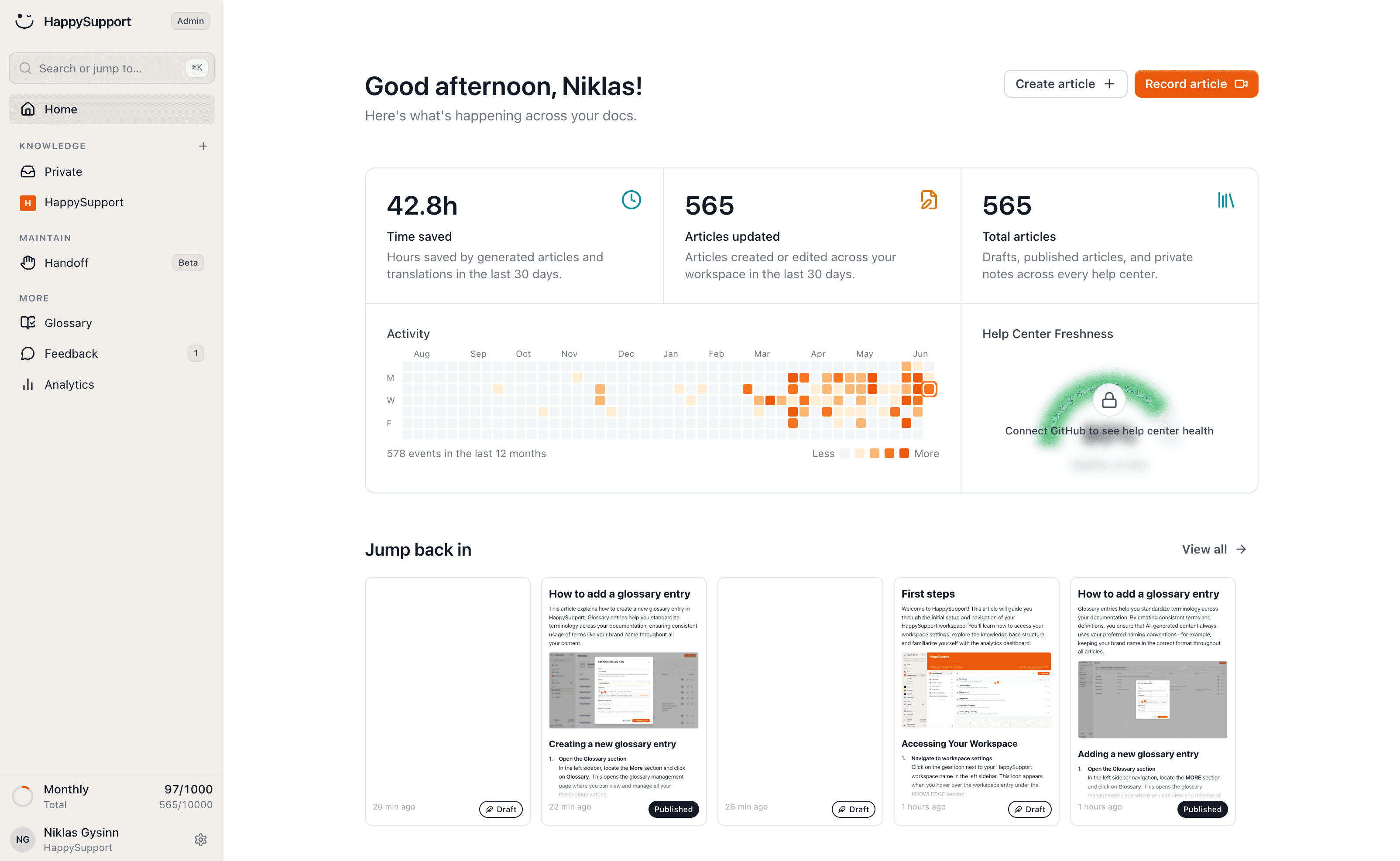
The Freshdesk alternative where articles stay true

Freshdesk's knowledge base is a layer inside the ticketing suite, and deflection is only ever as good as the articles behind it. HappySupport keeps those articles current itself: it writes, updates and translates them as your product changes. Enter your Freshdesk help center address and we'll bring everything across.
HappySupport vs Freshdesk: the short answer
Freshdesk is a ticketing system with a knowledge base, priced per agent. HappySupport is a support suite where the knowledge base leads: articles are created from a recording, translate themselves and are updated after every release, at a flat monthly price. If you mostly work through tickets, Freshdesk serves you well. If you want fewer tickets, you need articles that are right.
 Niklas GysinnFounder and CEO, HappySupport · ·
 These teams document with HappySupport



How do you write an article without an empty editor?
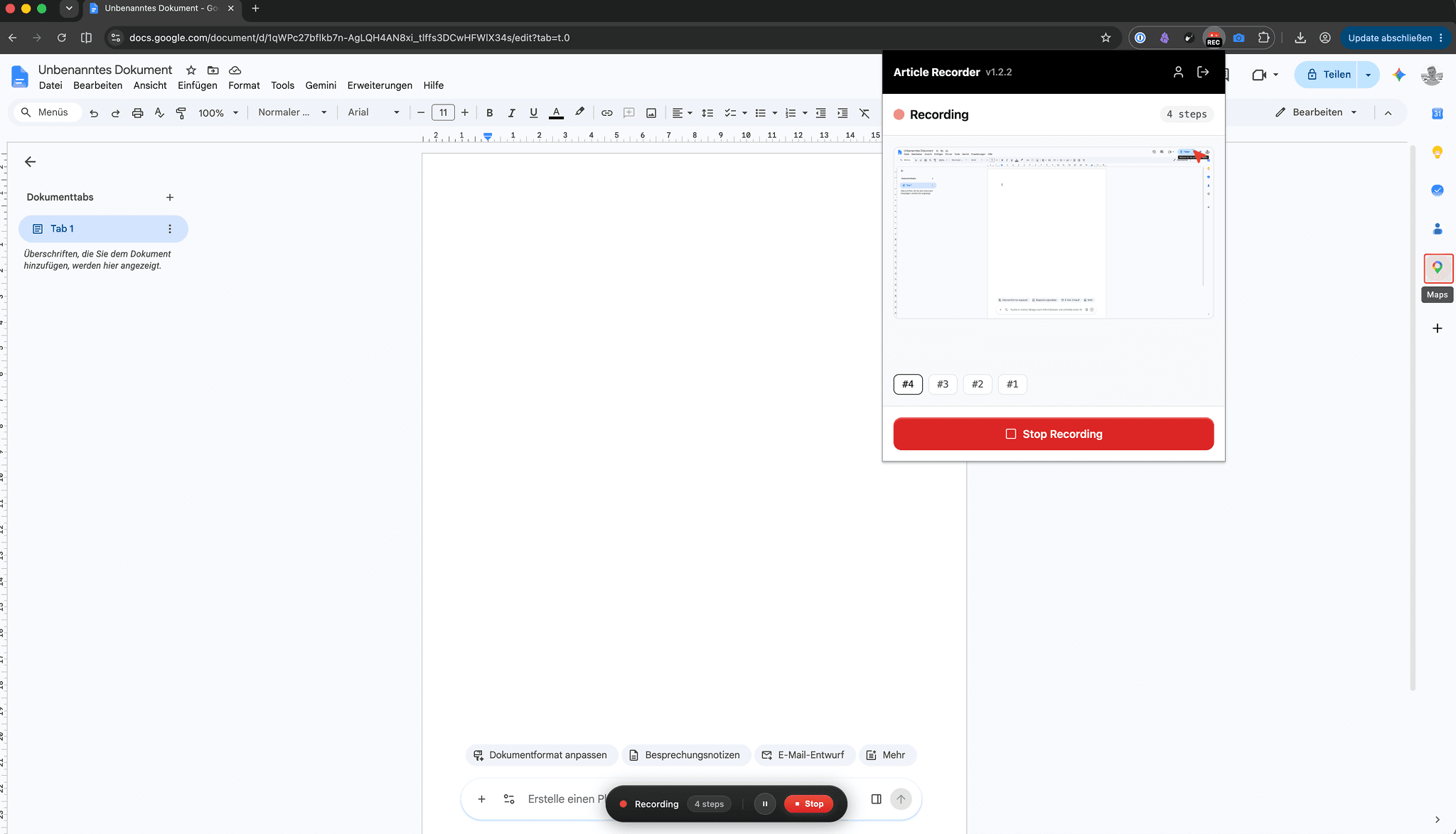
You click through the flow once and the recorder turns it into the finished article: every click becomes a step with a labelled screenshot, and what you say along the way becomes the text.
In Freshdesk every article starts with an empty editor. You write each step, take each screenshot, draw each arrow and assemble the whole thing by hand.
Half an hour of manual work per guide becomes two minutes.
How do the docs stay current when the product changes?
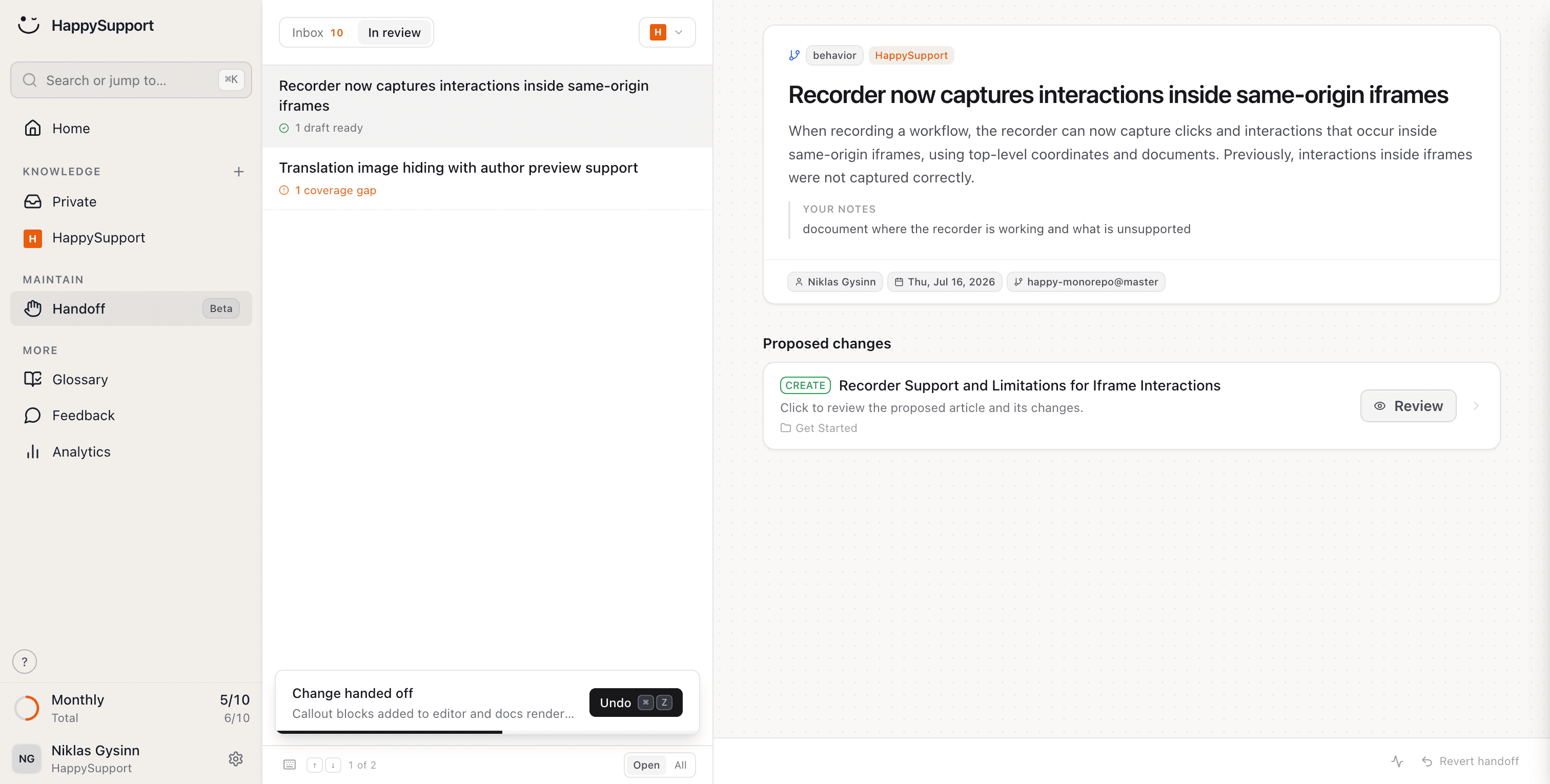
After every release HappySupport reads the changes in your repository, finds the articles they affect and hands you finished text edits to review.
Deflection has one dependency nobody prices in: the article has to be right. A knowledge base that quietly falls behind the product turns self-service into new tickets.
You review and approve. Self-service deflects because the answers are actually current.
What does your team stop doing after leaving Freshdesk?
Writing articles, updating them after releases, translating and checking them: HappySupport takes on these eight jobs. Freshdesk gives you a knowledge base next to the ticket queue. We take on the work of keeping it true.
Create articles just by clicking
Click through the flow once and a finished article comes out, annotated screenshots included. The article gets written by the person who already knew the answer.
AI article recorderYour docs stay current when your product changes
Handoff spots what changed in the product and proposes updates for exactly the articles it affects. Deflection stops depending on someone remembering to revisit the knowledge base.
Documentation from code changesCreate articles from what's in your code
Connect your repository and article drafts come out of what your engineers already wrote. The knowledge base fills from the product, not from the ticket queue.
AI documentation agentEvery article uses the same terms
Terms are agreed once and enforced across every article. Agents and articles use the same words, which is half of why a search finds anything.
Your help center checks itself
46 checks across six categories run continuously: dead links, stale articles, missing images, structure, SEO. You find out which articles are failing before the tickets tell you.
Documentation auditYour articles translate themselves
New languages appear automatically and stay current. Every market gets the same self-service, not just the one you had time to translate.
Multilingual knowledge baseCustomers find answers without the exact words
Semantic search finds the right article even when nobody remembers the exact heading. Self-service usually fails at the search box, long before the article gets a chance.
AI chatbot for customer serviceShare a single article by link
Every article has a link an agent can drop into a ticket reply, even out of a gated help center.
AI help centerWhat is the difference between Freshdesk and HappySupport?
Freshdesk puts a knowledge base next to the ticket queue; HappySupport creates, translates and updates the articles itself. Only the points where the two actually differ are listed here.
| Feature | HappySupport | Freshdesk |
|---|---|---|
| Create articles from a screen recording | ||
| Detect affected articles after a release | ||
| Flat monthly price instead of per agent | Priced per agent per month | |
| AI answers grounded in your own articles | From Professional, included in the plan | Freddy AI Agent, $49 per 100 sessions after a one-time 500 |
| Automatic translation, kept in sync | Manual per language, from Pro | |
| Enforced glossary across all articles | ||
| Continuous health check with auto-fix | 46 checks, 6 categories | |
| SEO control on the public help center | Limited | |
| Pricing | Per plan | Per agent, per month |

Ready to switch? Enter your Freshdesk help center address and we'll take it from there.
As of September 2026, checked against Freshworks' pricing and help pages (sources at the end of this page). Features depend on plan and add-ons; this compares the Freshdesk knowledge base (Solutions).
What do independent numbers say about Freshdesk?
Freshdesk is popular with its users and cheap to start with. The numbers below show how the cost grows with plan and AI usage, and what self-service delivers overall.
4.5/5
Capterra rating for Freshdesk across 3,481 reviews. Criticism centres on costs that rise with add-ons and higher plans.
$55
per agent per month for Pro, billed annually, the first plan with a multilingual knowledge base and article versioning.
$49
per 100 Freddy AI Agent sessions, once the 500 sessions included one time are used up.
14%
of customer service issues are fully resolved in self-service, according to a Gartner survey of 5,728 customers.
What does Freshdesk say, and what is our answer?
Freshdesk's strongest arguments are on its own pages, and some of them hold. Here is each one with its source and our answer to it.
Freshdesk says
“Up to 80% resolution rates” with Freddy AI.
Our answer
“Up to” is the important part: an AI resolves only what the knowledge base describes correctly. After the 500 free sessions, every session is billed too. HappySupport makes sure the articles are right after every release, and AI answers are included in the plan.
Freshdesk says
“A centralized, multilingual repository for support articles that help increase self-service rates.”
Our answer
Multilingual is true from the Pro plan. Every translation is manual work, though: according to the Freshworks Community there is no built-in automatic translation of knowledge base articles. HappySupport translates automatically and updates translations when the original changes.
Freshdesk says
“Ticket replies can then turn into solution articles instantly.”
Our answer
A good way to capture knowledge from tickets. It helps with creating articles, not with keeping them current: when a release changes the flow, the article stays as it was. HappySupport detects from your code which articles a release affects and proposes the edit.
Freshdesk says
“Freshdesk brings ready-to-use AI, people, and workflows together … so service improves from day one.”
Our answer
For a team that mostly works through tickets that holds, and Freshdesk is easy to use. If your goal is fewer tickets, the quality of the articles decides. HappySupport has its own ticket inbox, but you can also keep Freshdesk and move only the knowledge base.
How long does moving from Freshdesk take?
The import itself takes minutes: you enter your help center's address and the articles, images, structure and redirects come across. A help center is years of shared links, screenshots and cross-references. Moving off Freshdesk leaves none of it behind.
Shared links keep working
Every old Freshdesk address gets a redirect automatically. Bookmarks, links in old tickets and Google results still land on the right article, so your SEO moves with you.
Internal references stay intact
Cross-references between your Freshdesk articles are detected and relinked, so the chains of related answers survive the move.
Every image comes across
Screenshots and graphics are brought over in full and hosted by us. Nothing to re-upload, and nothing left hanging off Freshdesk afterwards.
Your structure is preserved
Categories, folders and the order of your articles come across the way your customers already know them. Nobody has to relearn where anything lives.
“Every product update used to mean a week of updating screenshots and rewriting guides. Now our docs update themselves. My team finally works on customer success instead of content maintenance.”
 Lisa AlberDirector of Customer Success
What do teams ask before leaving Freshdesk?
The questions teams ask us before a migration.
Can I import my existing Freshdesk articles?+
Yes. Enter your Freshdesk help center address and we bring across articles, images and structure. You don't need to export anything or upload anything by hand.
Can we keep Freshdesk for tickets?+
Yes, if you want to. HappySupport ships its own ticket inbox with AI chat escalation and email replies, so keeping Freshdesk is an option, not a requirement. Plenty of teams move only the knowledge base first. Agents still paste article links into replies, and the articles they paste are current.
Why does our knowledge base deflect so little?+
Usually not because it is too small but because it is quietly wrong. An article that describes last quarter's UI creates a ticket instead of preventing one. Keeping articles in step with releases is exactly the work HappySupport automates.
What happens to links our customers have already shared?+
Every old Freshdesk address gets a redirect automatically during the import. Links pasted into past ticket replies keep working, and your search rankings move with you.
Where is our data hosted?+
In the EU, by default and at no extra cost. No data-residency add-on to negotiate and no region to pick per plan.
How does HappySupport compare to Freshdesk on price?+
Current plans are on our pricing page. Freshdesk is cheap per agent at entry; the lines that grow are the hours your team spends keeping articles current by hand, and the AI sessions billed beyond the included quota.
About the author
 Niklas GysinnFounder and CEO, HappySupport
Niklas Gysinn founded HappySupport in Stuttgart in 2025 and runs the company from Heilbronn today. He works on the product himself and talks directly with the teams moving their help center over from Zendesk, Intercom, Confluence and other tools. These comparisons come out of those conversations and out of the vendors' public pricing and help pages.
Sources
HappySupport competes with Freshdesk, so this page is not neutral. That is why every number and every quote carries its source. Prices and ratings change; check them with the vendor before you decide.
- Freshworks, Freshdesk pricing (accessed September 2026)
- Freshdesk help, managing Freddy AI add-ons (August 2026)
- Capterra, Freshdesk reviews (accessed September 2026)
- Freshworks, Freshdesk homepage (accessed September 2026)
- Freshworks, Freshdesk knowledge base (accessed September 2026)
- Freshworks Community, automatic translation of knowledge articles (March 2025)
- Freshdesk help, where the data centers are located (accessed September 2026)
- Gartner, survey: only 14% of customer service issues are fully resolved in self-service (August 2024)
Your help center, ready before your coffee.
Start for free and publish your first article today.