HappySupport
AI chatbot for customer service

An AI chatbot that answers from your docs, not guesses

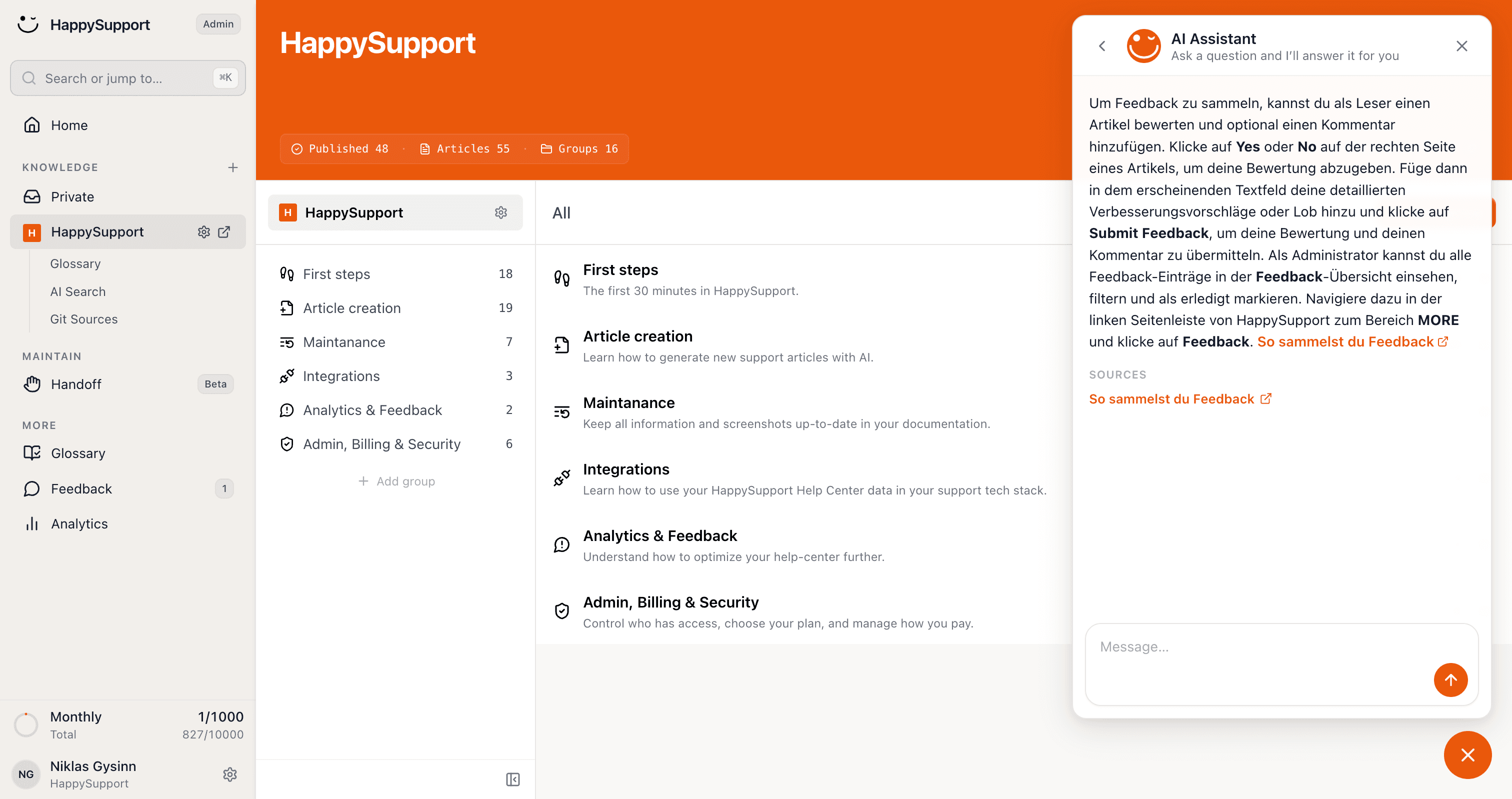
The HappySupport AI assistant answers customer questions in your help center and in the widget inside your app. It reads your articles first, names the ones it used, and hands the conversation to your team when your docs don't cover the question. So customers get a checked answer at any hour, and your team only sees what really needs a person.

The HappySupport help center with the AI assistant open on the right: it answers a question about collecting feedback and lists the article it used under Sources
In short

What the HappySupport AI chatbot does

The HappySupport AI chatbot is generative AI for customer service that answers only from your own help center. It searches your articles, reads the best matches in full, writes the answer in the customer's language and links every article it used. When no article covers the question, or the request needs someone to act in the account, it does not guess: it hands the conversation to your team as a ticket with a summary.

AI answers are included from Professional at 399 euros a month (250 answers) and on Scale at 899 euros (1,000 answers), billed yearly (479 or 1,079 euros billed monthly), excl. VAT, flat instead of per agent. The 14-day free trial includes 50 AI answers.

These teams document with HappySupport

FlipjupusPeakboardaworkneuroflashOMR Reviews
How it works

From the question to a checked answer

Every answer goes through the same three steps. That is what makes it something you can put in front of your customers.

How do I import contacts from a CSV file?

  • Searching "import contacts CSV"
  • Reading "Import contacts from a file"
  • Writing the answer

1. It reads before it writes

HappySupport searches your help center by keyword and by meaning at once, then reads the best articles in full. The customer watches it happen. So the answer comes from your current docs, not from what a model once learned about software in general.

Open Contacts, click Import and choose your CSV file. Map each column to a field, then start the import 1. Files with up to 10,000 rows usually finish within a minute 2.

Sources
  1. 1Import contacts from a file
  2. 2Import limits and file formats

2. Every answer names its sources

Each claim carries a marker like [1], and the articles are listed under the answer. HappySupport checks the list before it is shown: a source the AI didn't actually read, or one the customer may not see, is removed. So customers can check the answer, and they learn where it lives.

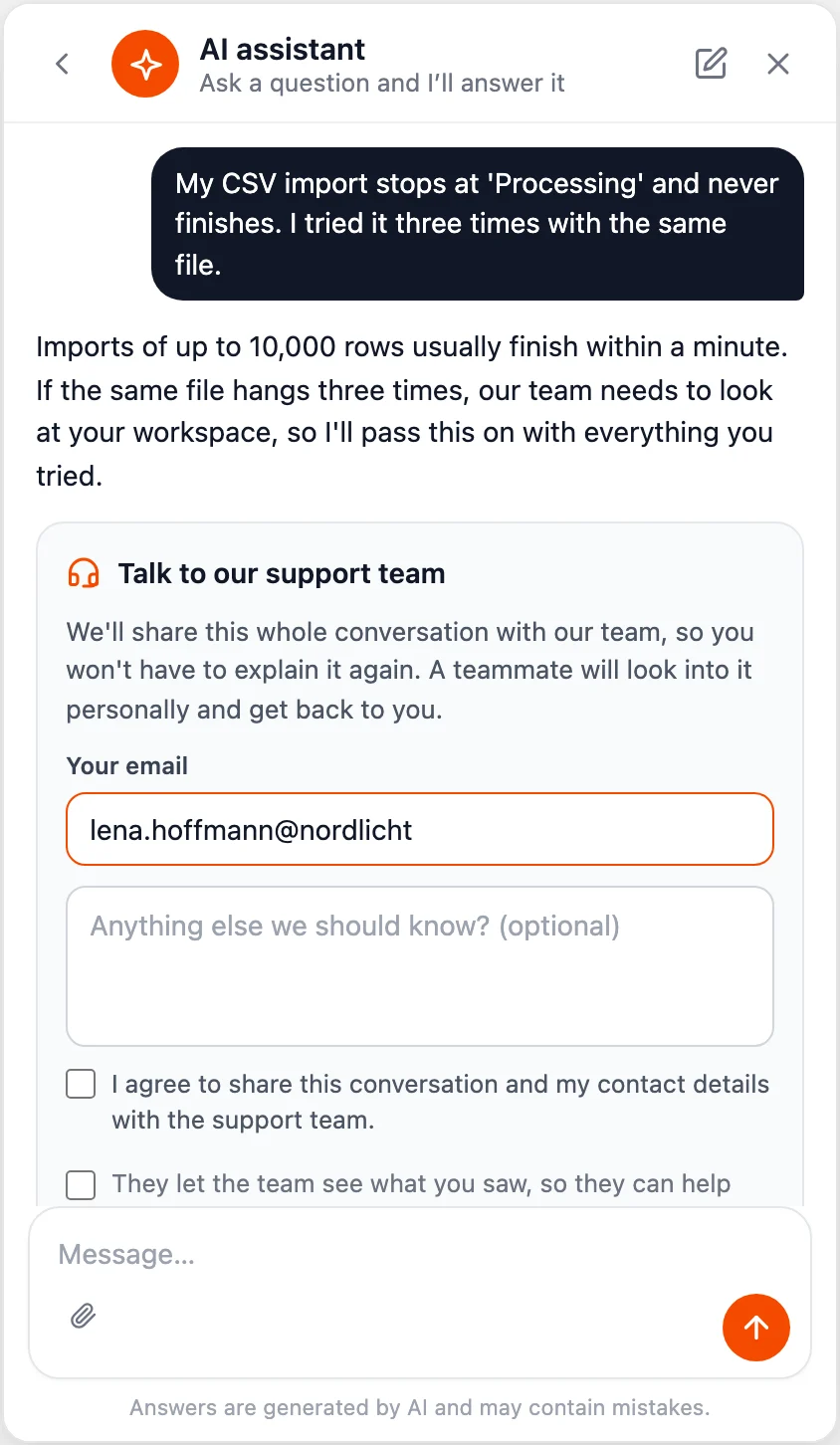
The HappySupport widget: the AI assistant explains that the team needs to look at the workspace and shows a form to contact the support team

3. It hands over instead of guessing

When your docs don't answer the question, or a refund, reset or plan change is needed, the AI says so and offers a person. The customer leaves their email and agrees to share the chat. Your team gets a ticket with the whole conversation, so nobody has to explain the problem twice.

When the AI stops

Your team starts where the AI left off

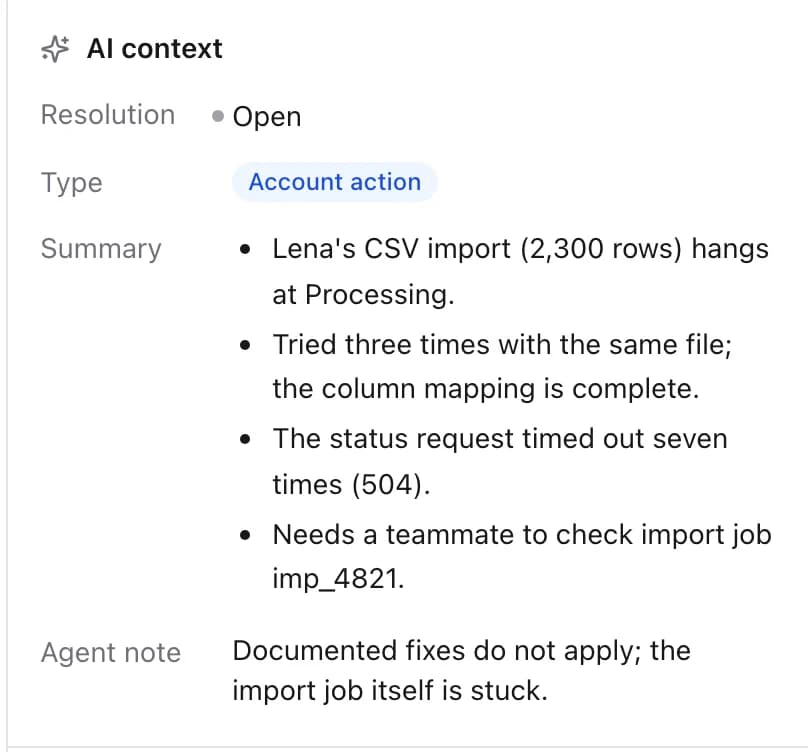
A handoff is not a dead end. HappySupport writes a summary of what the customer asked and tried, and notes why it handed over. So the first reply from your team already helps, instead of asking for details the customer gave the AI a minute ago.

Try the AI assistant
The AI context on a HappySupport ticket: type Account action, a four-point summary of a stuck CSV import, and the AI's note that the documented fixes don't apply
  1. Every gap becomes a new article

    Docs gap: no article answers the question. The ticket says so, so you see which article is missing and can have it written, and next time the AI answers it itself.

  2. Your team knows right away what to do

    Account action: the answer is known, but someone has to act, for example on a refund, a password reset, a cancellation or a change to the plan or the data. The AI explains what happens next instead of pretending it can do it.

  3. Sensitive cases reach you right away

    Flagged: complaints, legal threats or a customer in distress go straight to a person. The AI doesn't try to talk its way through a conversation that needs judgment.

What it answers from

Your knowledge, and nothing else

The AI assistant only uses what you give it. That keeps answers on your product and lets you decide what customers may see.

Import contacts from a filePublishedcited
Import limits and file formatsPublishedcited
Support playbook: stuck importsInternalnever cited

Internal articles: used, never shown

Mark an article as internal and the AI may use its knowledge, for example a limit or a workaround, but never cites, links or names it. Published articles appear as sources as usual. So you can give the AI background your customers should not read word for word.

Comment j'importe mes contacts depuis un fichier CSV ?

Ouvrez Contacts, cliquez sur Importer et choisissez votre fichier CSV.

Source: Import contacts from a file

Answers in the customer's language

The AI replies in the language the customer writes in, even when the article only exists in German or English, and switches when they do. If a translation exists, it cites that version.

import-error.png

The message "Column email is missing" means the file has no column mapped to Email.

It reads what customers attach

Customers can add a screenshot, a PDF or a log file to their question. The AI looks at it before it answers, so "this error" means something.

Verified: Lena Hoffmann, Nordlicht GmbH

Hi Lena, your import is still running. I'll pass this to the team with what you tried, you don't need to leave your email.

Signed-in customers are recognized

If your app signs the widget in, HappySupport knows who is asking. The AI greets them by first name, never asks for their email, and a handoff goes straight onto a ticket linked to that person. Articles you show only to certain roles stay out of answers for everyone else.

Settings

What you decide per help center

A few switches, no flow builder. You steer the AI through your content, not through scripts.

AI answers on or off

Each help center has its own switch. Turn the AI on for your customer help center and leave it off for another, while search keeps working everywhere.

Who can reach a person

Handoff to your team for everyone, only for signed-in customers, or off. With handoff off, the AI says plainly what the docs don't cover and never promises a callback.

Product and audience context

A short text per help center on what your product is and who uses it. The AI reads it with every question, so "projects" or "seats" mean what they mean in your product.

Your terms, spelled your way

Glossary entries pass your product terms to the AI, so it calls things by the names your interface uses. The glossary is included from Professional.

Articles only for some readers

On Scale you can show articles only to signed-in readers or certain roles. The AI respects the same rule: a customer never gets an answer from an article they may not open.

Only on your websites

You list the websites the widget may run on. Help centers behind a password or SSO ask for sign-in before the AI answers.

Better every week

See what customers ask, fix what's missing

An AI chatbot is only as good as the docs behind it. HappySupport is also your help center, so the fix is one click away from the problem.

Every conversation, filtered

All chats with the AI in one list, filtered by resolved by AI, needs attention and escalated. You see which articles the AI read and which it cited, so you can tell a weak article from a missing one.

Docs gaps on the ticket

When the AI hands over because no article covers the question, the ticket is marked as a docs gap, with the suggestion to add an article.

Felix writes the missing article

Ask Felix, the HappySupport assistant, on the ticket whether the question is documented. If not, it writes a new article or extends an existing one for you to review.

Docs that follow your releases

Git Handoff reads your commits and drafts updates for the articles a change affects. So the AI doesn't keep explaining last month's interface. Included from Professional.

A nightly health check

HappySupport checks your help center every night for stale articles, broken links and old screenshots, and links each finding to the screen that fixes it.

Usage you can see

A meter shows how many answers are used this month. Admins get an email at 80 and 100 percent, and nothing is charged automatically on top.

Keep reading

Around the AI chatbot

The AI answers first. These pages show where it answers and what happens after.

FAQ

The HappySupport AI chatbot in detail

What it costs, what it answers from and where its limits are.

Is there a free version of the HappySupport AI chatbot?+

No, HappySupport has no free plan. The 14-day free trial includes 50 AI answers, needs no credit card and comes with every Scale feature. After that, AI answers are included from Professional at 399 euros a month with 250 answers and on Scale at 899 euros with 1,000 answers, billed yearly (479 or 1,079 euros billed monthly), excl. VAT. Starter at 129 euros includes the help center and ticket inbox, but no AI answers.

What counts as one AI answer in HappySupport?+

Every reply the AI assistant sends to a customer's message counts as one answer, in the help center and in the widget. The allowance is shared by all help centers of your workspace and resets every month. Requests that fail, find no articles or come from bots don't count, and neither does your team's own use of Felix in the studio.

What happens when the AI answers for the month are used up?+

AI answers pause until the next month, and search in the help center and widget keeps working. Customers see a short note to use search instead, never your usage numbers. Admins get an email at 80 and at 100 percent. HappySupport never bills overage automatically; 250 more answers a month cost 100 euros billed yearly (120 euros billed monthly), excl. VAT, and are added on request.

What does the HappySupport AI chatbot answer from?+

From the published and internal articles of the help center it runs in, your glossary terms and a short product description you write per help center. It does not crawl your website, read PDFs you upload as a knowledge base or look into your code. Files a customer attaches to a question, such as screenshots, PDFs and log files, are read for that conversation.

Can the HappySupport AI chatbot give wrong answers?+

It answers only from your articles, so it is as right as they are. HappySupport removes any source the AI didn't actually read before the answer is shown, and when no article covers a question, the AI says so and offers a person instead of guessing. To keep the articles right after a release, Git Handoff flags the ones a code change affects and drafts the update.

Where do customers use the HappySupport AI chatbot?+

In two places: the Ask AI panel in your help center, which opens from the search bar or with Cmd+I and stays open while readers move between articles, and the Ask AI tab of the widget inside your app. Both keep the conversation, so customers can ask follow-up questions.

In which languages does the HappySupport AI chatbot answer?+

In the language the customer writes in, even when the article exists only in another language. When a translation of the article exists, the AI reads and cites that version. The buttons and labels of the help center and the widget are available in English and German.

Can I give the HappySupport chatbot its own name, tone or instructions?+

Not today. The assistant is called AI assistant, and its tone is fixed: friendly, concise and professional. You steer it through your articles, a product and audience description per help center and your glossary. Custom prompts, personas and scripted flows are not available.

How do I set up the AI chatbot in HappySupport?+

Import your existing articles from Zendesk, Intercom, HubSpot, Help Scout, Freshdesk or another help center, or record new ones. Switch on AI answers for the help center, and add the widget to your app with one script tag and the websites it may run on. The help center's Ask AI panel works right away.

Is the HappySupport AI chatbot GDPR compliant?+

Yes. HappySupport is hosted in Germany and provides a data processing agreement. Customer answers are generated with Microsoft Azure OpenAI in Sweden, and your data is never used to train models. Before a handoff, the customer explicitly agrees to share the conversation and their contact details. There is no SOC 2 report.

How is the HappySupport chatbot different from ChatGPT or a chatbot builder?+

ChatGPT answers from its training data and knows nothing about your product. Chatbot builders usually need you to design flows and feed them a knowledge source you maintain somewhere else. In HappySupport the knowledge source is your help center itself: you record and update articles in the same tool, and the AI answers from them with sources.

Your help center, ready before your coffee.

Start for free and publish your first article today.

HappySupport