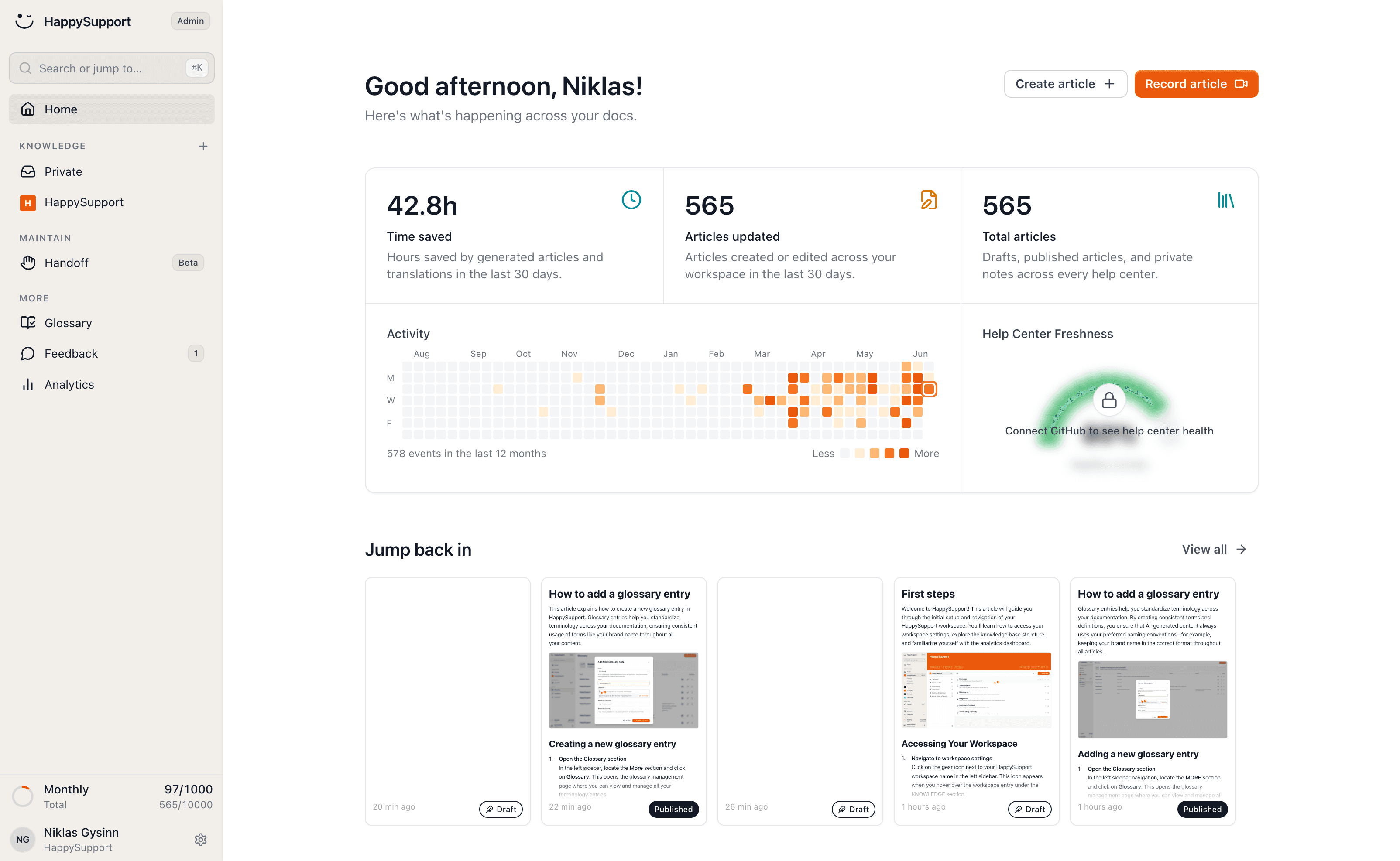
The Crisp alternative for your help center

Crisp is a messaging inbox first: the knowledge base starts on Essentials, articles are written in Markdown by hand, and content suggestions only arrive on Plus, from conversations that already went wrong. HappySupport is a support suite built around the help center: articles come from a recording, translate themselves and get updated after every release, with AI answers that quote only those articles. Enter your help center address and we set your new one up in your brand.
HappySupport vs Crisp: the short answer
Crisp is a customer messaging platform: chat widget, shared inbox across email and social channels, and the Hugo AI agent, at a flat price per workspace. Its knowledge base is one module from the Essentials plan. HappySupport is a support suite that starts with the help center: articles come from a recording, translate themselves and are updated after every release, and AI answers and the ticket inbox build on them. If live chat on many channels is your main job, Crisp is the cheaper and broader tool. If your customers should find the answer themselves, switch to HappySupport.
 Niklas GysinnFounder and CEO, HappySupport ·
 These teams document with HappySupport



How do you write help articles without Markdown?
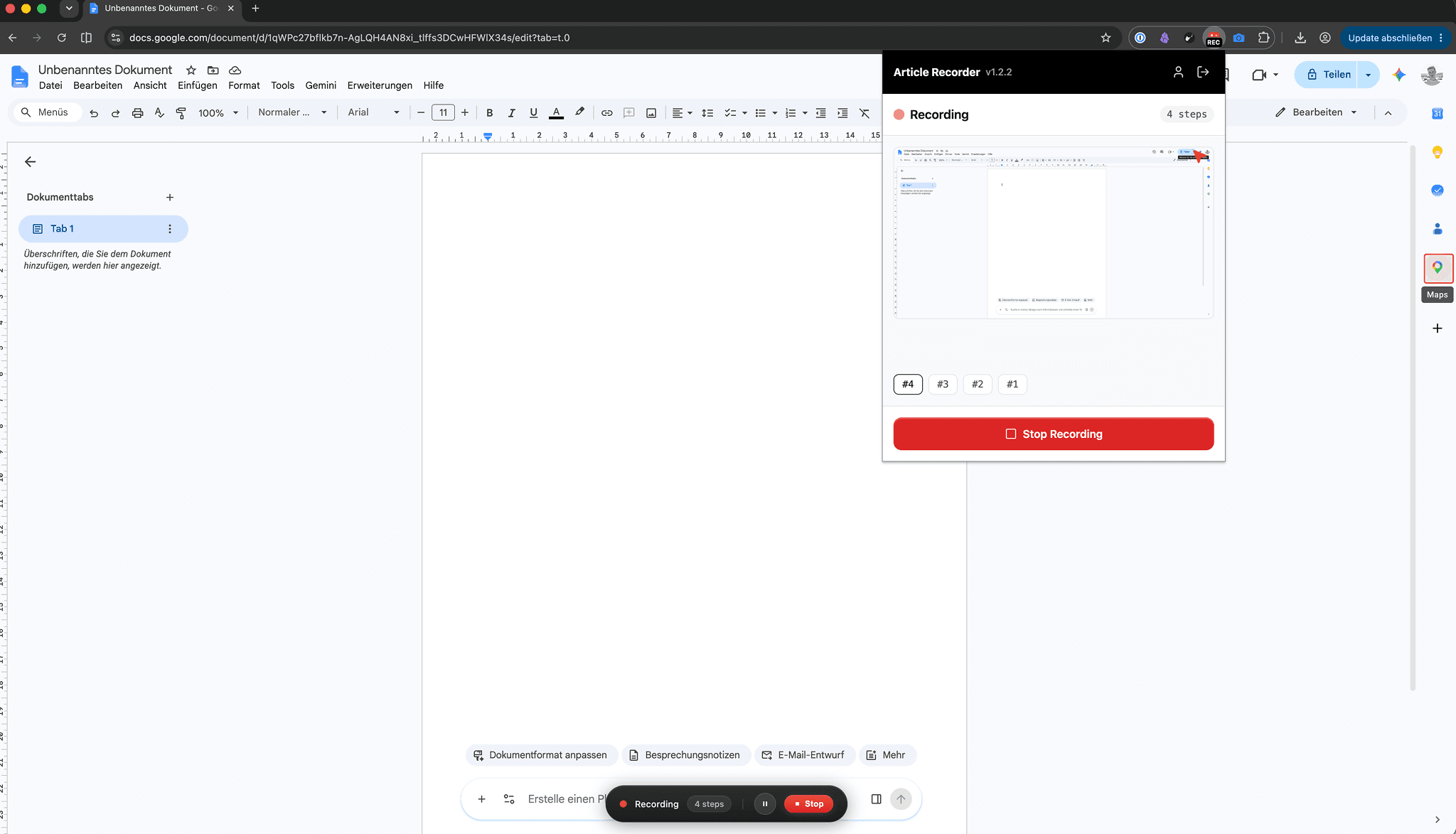
You click through the process once and the recorder turns it into the finished article: every click becomes a step with a labelled screenshot, and what you say becomes the text.
In the Crisp knowledge base, articles are Markdown files in folders. You write every step and take, crop and upload every screenshot yourself.
Half an hour of manual work per guide becomes two minutes.
How does the help center learn that the product changed?
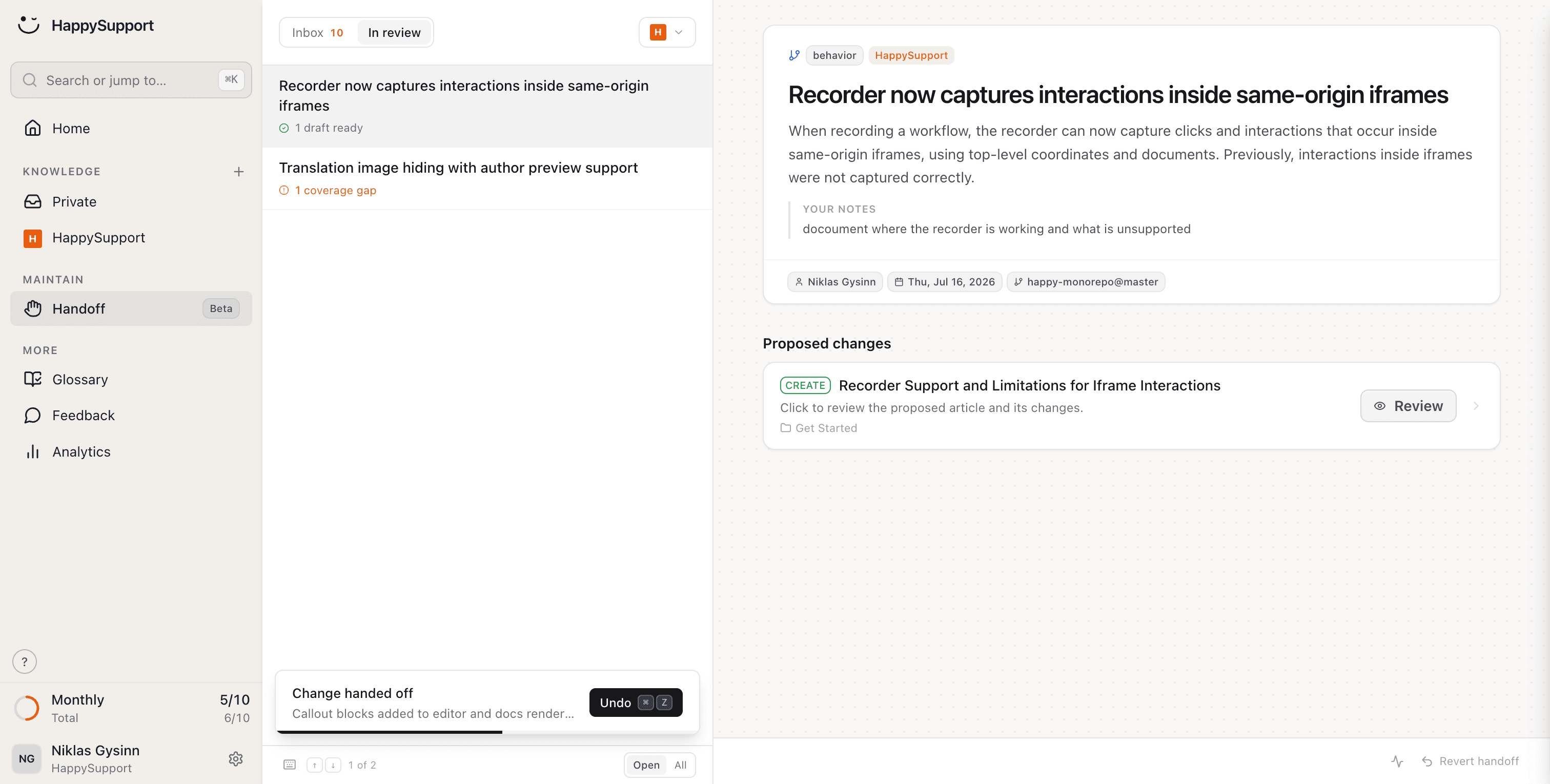
After every release HappySupport reads the changes in your repository, finds the affected articles and puts ready-made edits in front of you for review.
Crisp's Hugo AI Suggestions propose additions, edits and removals from recurring knowledge gaps in customer conversations, on the Plus plan. The article is updated after customers have asked about it.
You review and confirm before the first customer reads the outdated version.
What does your team stop doing by hand after leaving Crisp?
Writing articles, updating them after releases, translating them and checking them: HappySupport takes on these eight jobs. In Crisp the knowledge base sits beside the inbox; in HappySupport it is the center.
Create articles just by clicking
Click through the process once and the finished article is there, with labelled screenshots. No Markdown, no screenshot uploads.
AI article recorderYour docs stay current when your product changes
Handoff detects what changed in your repository and suggests updates to exactly the articles it affects, on GitHub, GitLab or Bitbucket.
Documentation from code changesCreate articles from your code
Connect your repository, and article drafts come from what your developers have already written.
AI documentation agentEvery article uses the same terms
You define terms once and every article follows them, in every language.
Your help center checks itself
48 checks across seven categories run continuously: broken links, outdated articles, missing images, structure, SEO. Included from Professional.
Documentation auditYour articles translate themselves
New languages are created automatically and follow when the original changes, so no language falls a release behind.
Multilingual knowledge baseAI answers only from your articles
Semantic search finds the right article in the customer's own words, and AI answers quote only your articles, with sources.
AI chatbot for customer serviceShare single articles by link
Every article has a link your team can drop straight into a chat reply, even from a password-protected help center.
AI help centerWhat is the difference between Crisp and HappySupport?
Crisp is a messaging inbox with a knowledge base; HappySupport is a help center that creates and maintains its articles and comes with an inbox. Only the points where the two really differ are listed here.
| Feature | HappySupport | Crisp |
|---|---|---|
| Knowledge base included | In every plan | From Essentials, $95 a month |
| Pricing model | Flat per plan, in EUR | Flat per workspace plus $10 per extra agent, in USD |
| AI answers | 250 or 1,000 a month from Professional | Credits worth $5 to $75 a month, then stops or pay-as-you-go |
| Article authoring | From a screen recording | Markdown editor |
| Detect affected articles after a release | ||
| Content suggestions | From code changes, from Professional | From conversations, Plus only |
| Continuous health check with auto-fix | 48 checks, 7 categories | |
| Channels | Help center, in-app widget, ticket inbox | Chat, email, WhatsApp, Instagram, Messenger, SMS, phone and more |
| Ticketing system | In the suite | Plus only |
| Hosting | In Germany | In the EU (Netherlands and Germany) |

Ready to switch? Enter your help center address and we'll set up your new one.
As of October 2026, checked against Crisp's pricing page and help center (sources at the end of the page). Crisp prices are monthly per workspace; Hugo conversation counts are Crisp's own estimate.
What do Crisp's knowledge base and Hugo really cost?
Crisp is a fairly priced, bootstrapped inbox with honest numbers. They show where the knowledge base and the AI start, and where they stop.
$95
per workspace a month for Essentials, the cheapest Crisp plan with a knowledge base, a multilingual help center and a custom domain.
~450
Hugo conversations a month on Essentials, from $25 of included credits. Once used up, Hugo stops answering and escalates to people.
$295
per workspace a month for Plus, the only plan with Hugo AI Suggestions for outdated or missing knowledge and the ticketing system.
14%
of service issues are fully resolved in self-service, according to a Gartner survey of 5,728 customers.
What speaks for Crisp, and what do we say?
Crisp is trusted by 10,000 companies and gets a lot right. Each argument is here with its source and our answer.
For Crisp
Crisp charges a flat rate per workspace, regardless of the number of conversations.
Our answer
True, and we agree with the model: HappySupport is priced flat per plan too. The difference is what the flat price buys. Crisp's covers an inbox across many channels; ours covers a help center that writes and maintains itself, with AI answers and a ticket inbox on top.
For Crisp
A full Hugo conversation costs around $0.05 to $0.10, with a choice of OpenAI, Anthropic, Google, Mistral or a Crisp-hosted model.
Our answer
That is cheap, and Crisp says itself it remains an estimate. The cost that matters is the wrong answer: Hugo answers from whatever the knowledge base says. HappySupport keeps the knowledge base current after every release, so the AI has the right article to quote.
For Crisp
Hugo AI Suggestions turn knowledge gaps from conversations into additions, edits and removals, which you approve.
Our answer
A good loop, available on Plus at $295 a month. It reacts to questions customers have already asked. HappySupport starts from the release: it reads what changed in your code and marks the articles before customers notice.
For Crisp
All Crisp data is hosted in the European Union, and Crisp is GDPR compliant.
Our answer
True, and on this point the two tools are equal: HappySupport hosts in Germany and signs a data processing agreement. Neither of us has a SOC 2 report.
How do you move from Crisp to HappySupport?
We have no one-click Crisp import yet. We recommend recording your most-used guides fresh, pasting the remaining articles in for Felix to structure, and mapping the old addresses in one pass. You can keep Crisp for live chat throughout.
Shared links keep working
The redirect wizard reads your old help center sitemap and matches every address to the new article by title and slug. Links in old chats and Google results still land on the right page.
Markdown articles come out structured
Paste a Crisp article into the editor and Felix, the AI agent included in every plan, turns it into steps, headings and callouts you can review.
Outdated screenshots are replaced, not migrated
Re-record a guide once and every screenshot is new and labelled. From Professional, single screenshots are recaptured automatically when the UI changes.
Keep Crisp for chat if you like
You can keep Crisp as the chat inbox and link HappySupport articles into replies. The HappySupport widget can also take over article search, AI answers and the contact form.
“Every product update used to mean a week of updating screenshots and rewriting guides. Now HappySupport drafts the updates and we review them. My team finally works on customer success instead of content maintenance.”
 Lisa AlberDirector of Customer Success at Flip
What do teams ask before switching from Crisp?
The questions teams ask us before a migration.
Can we keep Crisp for live chat and use HappySupport for the help center?+
Yes. Crisp stays the chat inbox, and your team links HappySupport articles straight into its replies. You only pay for Crisp Essentials if you need its omnichannel inbox, not for the knowledge base.
Can I import my existing Crisp articles?+
Not with one click yet. Paste existing articles into the editor and Felix structures them for review, and the redirect wizard maps your old addresses from the sitemap. Re-recording the guides that matter also replaces outdated screenshots.
Is Crisp cheaper than HappySupport?+
For a chat inbox, yes: Crisp Essentials costs $95 a month with 4 agents and a knowledge base. HappySupport costs €129, €399 or €899 a month and includes the recorder, automatic translation, release-based updates, health checks and AI answers from Professional, which Crisp does not offer or offers only on Plus.
What replaces Hugo?+
HappySupport's AI answers respond in the help center and the widget, only from your own articles and with sources. 250 answers a month are included in Professional and 1,000 in Scale; at the limit, search keeps working and nothing is charged automatically.
Does HappySupport cover WhatsApp, Instagram or phone like Crisp?+
No. HappySupport answers in your help center and the in-app widget, and your team handles tickets from chat escalations, the contact form and email. For messaging on social channels, Crisp is the broader tool.
Where is our data stored?+
In Germany. HappySupport is GDPR compliant, hosts in Germany by default and does not train AI on customer data. Crisp also hosts in the EU, in the Netherlands and Germany.
About the author
 Niklas GysinnFounder and CEO, HappySupport
Niklas Gysinn founded HappySupport in Stuttgart in 2025 and runs the company from Heilbronn today. He works on the product himself and talks directly with the teams moving their help center over from Zendesk, Intercom, Confluence and other tools. These comparisons come out of those conversations and out of the vendors' public pricing and help pages.
Sources
HappySupport competes with Crisp, so this page is not neutral. That is why every number and every quote carries its source. Prices and ratings change; check them with the vendor before you decide.
- Crisp, Pricing and plans (retrieved October 2026)
- Crisp Help, Hugo pricing and billing explained (retrieved October 2026)
- Crisp Help, How to choose and configure Hugo's AI model (retrieved October 2026)
- Crisp Help, How to use the Knowledge Base (retrieved October 2026)
- Crisp Help, How to format Knowledge Base articles (retrieved October 2026)
- Crisp Help, How to use Hugo AI Suggestions (retrieved October 2026)
- Crisp Help, Crisp EU GDPR compliance status (retrieved October 2026)
- Crisp Help, Crisp compliance status with SOC 2 (retrieved October 2026)
- Gartner, Survey finds only 14% of customer service issues are fully resolved in self-service (August 2024)
Your help center, ready before your coffee.
Start for free and publish your first article today.