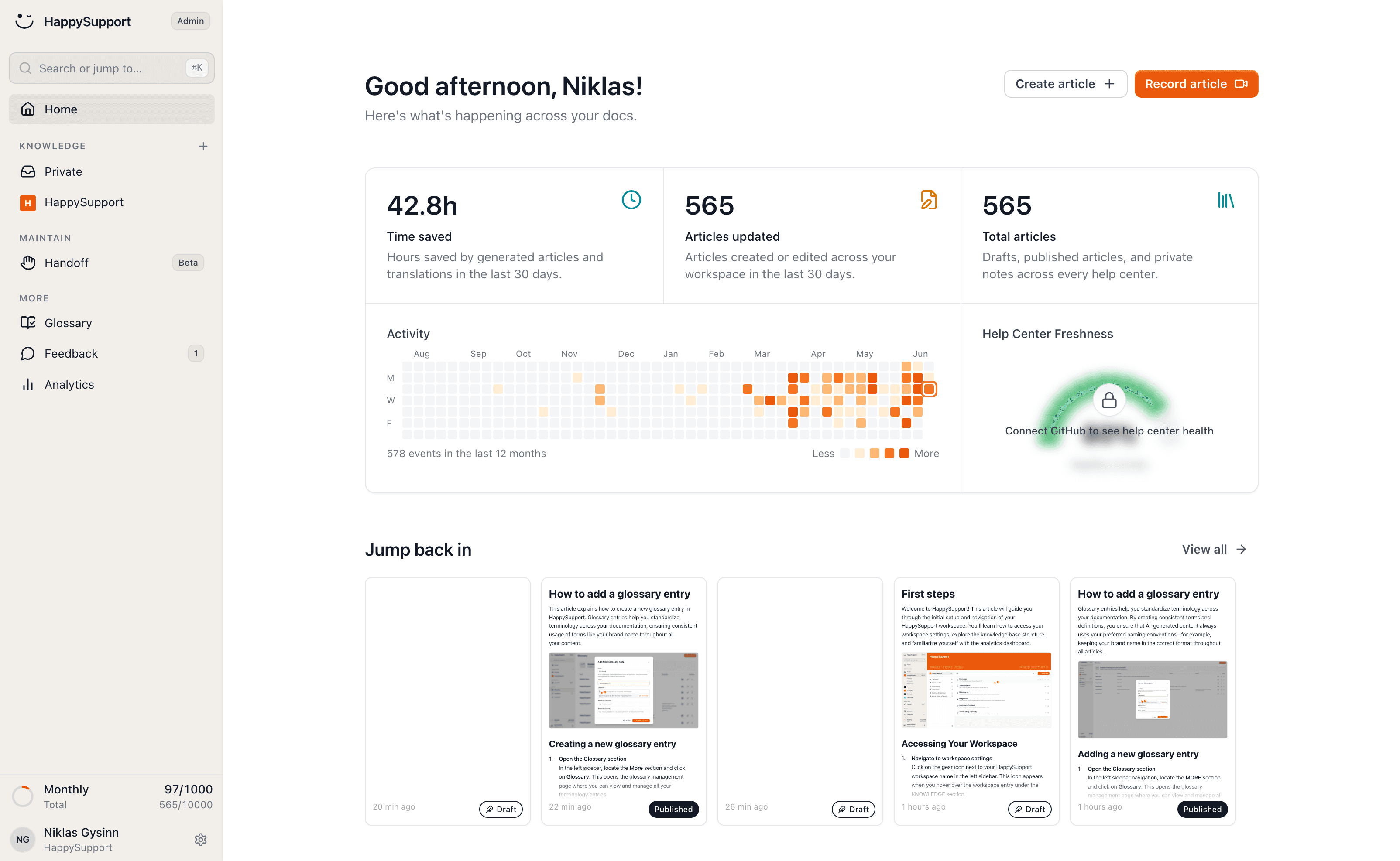
The Help Scout alternative for your help center

Help Scout bills per user, charges $0.75 for every conversation AI Answers resolves, and every Docs article starts in an empty editor, one language per Docs site. HappySupport is a support suite built around the help center: articles come from a recording, translate themselves and get updated after every release, at a flat monthly price with AI answers included. Enter your Docs address and we set your new help center up in your brand.
HappySupport vs Help Scout: the short answer
Help Scout is a shared inbox with a knowledge base (Docs) and a widget (Beacon), priced per user, with AI Answers billed per resolution. HappySupport is a support suite that starts with the help center: articles come from a recording, translate themselves and are updated after every release, with AI answers and a ticket inbox at a flat monthly price. If email and multichannel conversations are the center of your support, Help Scout serves you well. If your customers should find the answer before they write, switch to HappySupport.
 Niklas GysinnFounder and CEO, HappySupport ·
 These teams document with HappySupport



How do you create a Docs article without an empty editor?
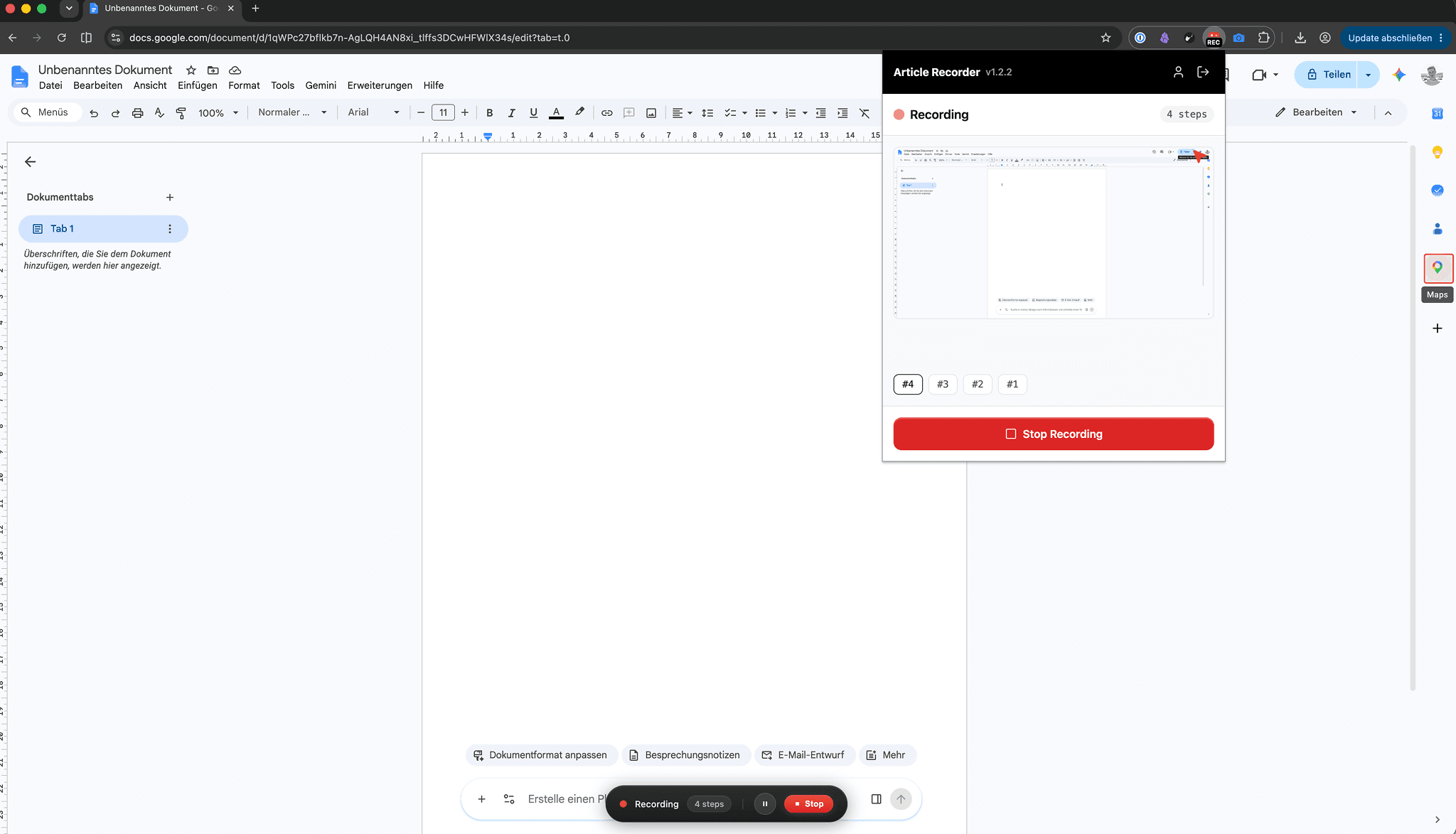
You click through the process once and the recorder turns it into the finished article: every click becomes a step with a labelled screenshot, and what you say becomes the text.
In Help Scout Docs you type the article or paste it in, and upload every screenshot yourself as a PNG, GIF or JPG of up to 10 MB.
Half an hour of manual work per guide becomes two minutes.
How do Docs stay current when the product changes?
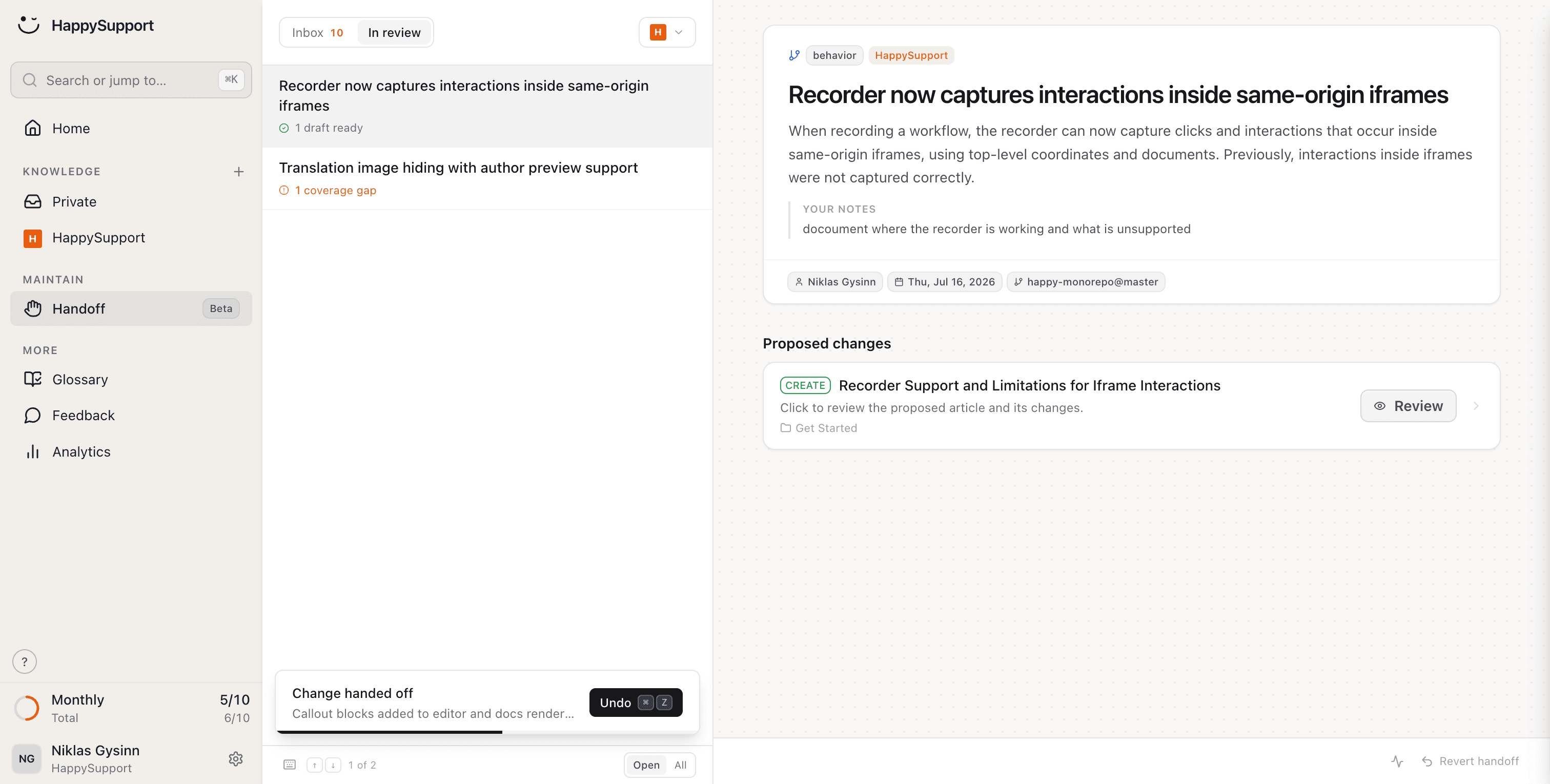
After every release HappySupport reads the changes in your repository, finds the affected articles and puts ready-made edits in front of you for review.
Help Scout points you to the failed searches report and to answer improvements after a conversation went wrong. Both show a gap once a customer has already hit it.
You review and confirm. AI Answers and your readers quote articles that are actually right.
What does your team stop doing by hand after leaving Help Scout?
Writing articles, updating them after releases, translating them and wiring them to the right pages: HappySupport takes on these eight jobs. In Help Scout, Docs is one part of an inbox product; in HappySupport the help center is the center.
Create articles just by clicking
Click through the process once and the finished article is there, with labelled screenshots. No more uploading cropped PNGs one by one.
AI article recorderYour docs stay current when your product changes
Handoff detects what changed in your repository and suggests updates to exactly the articles it affects, on GitHub, GitLab or Bitbucket.
Documentation from code changesCreate articles from your code
Connect your repository, and article drafts come from what your developers have already written.
AI documentation agentEvery article uses the same terms
You define terms once and every article follows them, in every language.
Your help center checks itself
48 checks across seven categories run continuously: broken links, outdated articles, missing images, structure, SEO. Included from Professional.
Documentation auditAll languages in one help center
In Help Scout each language is its own Docs site, maintained separately. In HappySupport new languages are created automatically and follow when the original changes.
Multilingual knowledge baseAI answers without a per-resolution bill
Semantic search finds the right article in the customer's own words, and AI answers quote only your articles, with sources. The allowance is part of the plan.
AI chatbot for customer serviceShare single articles by link
Every article has a link your team can drop straight into a reply, even from a password-protected help center.
AI help centerWhat is the difference between Help Scout and HappySupport?
Help Scout is an inbox that comes with a knowledge base; HappySupport is a help center that creates and maintains its articles and comes with an inbox. Only the points where the two really differ are listed here.
| Feature | HappySupport | Help Scout |
|---|---|---|
| Pricing model | Flat per plan, in EUR | Per user per month, in USD |
| AI answers | 250 or 1,000 a month included from Professional | $0.75 per resolution, add-on |
| Languages | Automatic translation in one help center | One Docs site per language |
| Knowledge bases per plan | 1, 3 or 5 help centers | 1, 2, 3 or 5 Docs sites, extra $20 a month |
| Create articles from a screen recording | ||
| Detect affected articles after a release | ||
| Articles suggested on the right page | Contextual help in the widget | Up to 200 URLs per Beacon, set by hand |
| Continuous health check with auto-fix | 48 checks, 7 categories | Failed searches report |
| Shared inbox across email, chat and social | Ticket inbox for chat and email | Email, chat, WhatsApp, Instagram, Messenger, SMS |
| Hosting | In Germany | AWS in the United States |
| SOC 2 | Type 2 |

Ready to switch? Enter your Docs address and we'll set up your new help center.
As of October 2026, checked against Help Scout's pricing, security and help pages (sources at the end of the page). User prices are the annual rates; Docs site counts refer to the Free, Standard, Plus and Pro plans.
What does Help Scout really cost as the team grows?
Help Scout is a well-liked inbox with a free plan. The numbers below show what the knowledge base and AI cost once real traffic arrives.
$225
a month for five users on Plus billed annually, before the first AI resolution. Pro starts at a minimum of 10 users at $75 each.
$0.75
per AI Answers resolution: a conversation the AI closes without the customer escalating, searching or asking again.
200 URLs
per Beacon for page-specific article suggestions, with up to 5 articles each, entered by hand.
14%
of service issues are fully resolved in self-service, according to a Gartner survey of 5,728 customers.
What speaks for Help Scout, and what do we say?
Help Scout has a strong reputation for being easy to use, and several of its arguments hold. Each one is here with its source and our answer.
For Help Scout
There is a Free plan with up to 5 users, 1 inbox and 1 Docs site.
Our answer
True, and it is a good way to start. The free Docs site holds 10 articles, AI Answers needs a paid plan after the trial, and every added user moves the bill. HappySupport has no free plan; it has a 14-day trial and a flat price per plan.
For Help Scout
AI Answers only charges for real resolutions, with a 3-month free trial and a monthly spending cap.
Our answer
A fair model, but the cost grows with every question your docs answer well, and at the cap AI Answers is switched off. HappySupport includes AI answers in the plan, and search keeps working at the limit. More importantly, both AIs are only as good as the articles behind them, and HappySupport keeps those current.
For Help Scout
Help Scout is SOC 2 Type 2 certified and offers HIPAA with a signed BAA.
Our answer
True, and HappySupport has no SOC 2 report and signs no BAA. We host in Germany, sign a GDPR data processing agreement and do not train AI on customer data. Help Scout is hosted on AWS in the United States.
For Help Scout
Docs can serve several languages, and Help Scout recommends Weglot or Transifex for translation.
Our answer
In Docs itself, each language is a separate site with its own settings, counted against the plan's site limit. The alternative is a third-party translation subscription. HappySupport translates every article automatically and updates the translations when the original changes.
How do you move from Help Scout Docs to HappySupport?
Help Scout exports Docs articles only through its Docs API, and we have no one-click Help Scout import yet. We recommend recording your most-used guides fresh, pasting the rest in for Felix to structure, and mapping the old addresses in one pass.
Shared links keep working
The redirect wizard reads your old Docs sitemap and matches every address to the new article by title and slug. Links in old replies and Google results still land on the right page.
Pasted articles come out structured
Paste an existing Docs article into the editor and Felix, the AI agent included in every plan, turns it into steps, headings and callouts you can review.
Outdated screenshots are replaced, not migrated
Re-record a guide once and every screenshot is new and labelled. From Professional, single screenshots are recaptured automatically when the UI changes.
Beacon makes way for one widget
The HappySupport widget replaces Beacon: article search, AI answers from Professional, contextual help on the right page and handover to your ticket inbox.
“We hired 2.5 full-time people just to build and maintain our help center. HappySupport would have saved us over €5,000/month.”
 Fabian SilbererCo-Founder of sevDesk and investor in HappySupport
What do teams ask before switching from Help Scout?
The questions teams ask us before a migration.
Can we keep the Help Scout inbox and move only Docs?+
Yes. You can keep Help Scout for email and chat and move only the help center. Your team then links HappySupport articles straight into its Help Scout replies.
Can I import my existing Help Scout Docs articles?+
Not with one click yet. Help Scout makes Docs available through its Docs API, and we set up redirects from your old sitemap. We recommend re-recording the guides that matter and pasting the rest, which Felix structures for review.
How does the price compare for a team of five?+
Five users on Help Scout Plus cost $225 a month billed annually, plus $0.75 for each AI resolution. HappySupport Professional costs €399 a month for 5 team members, 250 AI answers, 3 help centers and 5 additional languages, with no per-resolution fee.
What replaces AI Answers?+
HappySupport's AI answers respond in the help center and the widget, only from your own articles and with sources. 250 answers a month are included in Professional and 1,000 in Scale; more cost €100 per 250.
Where is our data stored?+
In Germany. HappySupport is GDPR compliant and hosts in Germany by default. Help Scout states that it is hosted on AWS servers in the United States.
Does HappySupport have a shared inbox like Help Scout?+
It has a ticket inbox for chat escalations, the widget contact form, manual tickets and email replies, with notes, priority, status and assignees. It does not cover WhatsApp, Instagram, SMS or SLA rules; if those are central, keep Help Scout for the inbox.
About the author
 Niklas GysinnFounder and CEO, HappySupport
Niklas Gysinn founded HappySupport in Stuttgart in 2025 and runs the company from Heilbronn today. He works on the product himself and talks directly with the teams moving their help center over from Zendesk, Intercom, Confluence and other tools. These comparisons come out of those conversations and out of the vendors' public pricing and help pages.
Sources
HappySupport competes with Help Scout, so this page is not neutral. That is why every number and every quote carries its source. Prices and ratings change; check them with the vendor before you decide.
- Help Scout, Pricing (retrieved October 2026)
- Help Scout Docs, AI Answers (retrieved October 2026)
- Help Scout Docs, About AI Answers, Beacons and AI agents (retrieved October 2026)
- Help Scout Docs, About the Docs editor (retrieved October 2026)
- Help Scout Docs, Translations (retrieved October 2026)
- Help Scout Docs, Content suggestions by URL (retrieved October 2026)
- Help Scout Docs, How to fix failed searches (retrieved October 2026)
- Help Scout Docs, Data export (retrieved October 2026)
- Help Scout Docs, Help Scout and GDPR (retrieved October 2026)
- Help Scout, Security (retrieved October 2026)
- Gartner, Survey finds only 14% of customer service issues are fully resolved in self-service (August 2024)
Your help center, ready before your coffee.
Start for free and publish your first article today.