Your security team flags it on the call: the new help center has to support SAML SSO. You go check the vendor pricing page. SSO is not listed. You ask sales. SSO is on the Enterprise plan. The Enterprise plan is four times the price of the tier you actually need.
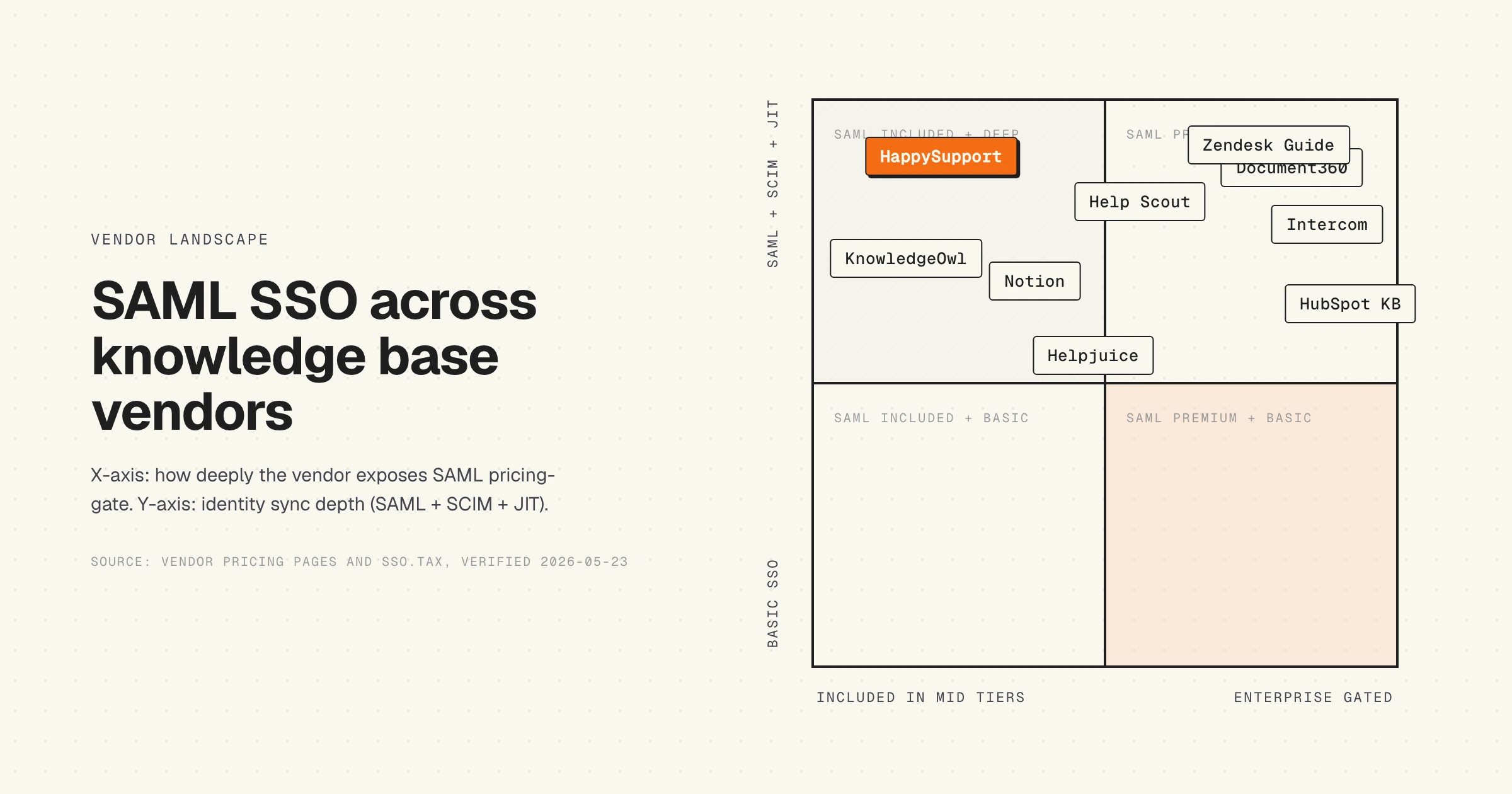
This is the SSO tax, and most knowledge base vendors charge it. Intercom marks the upgrade at 355% above its base tier. HubSpot moves Service Hub Professional buyers to Enterprise at 233% or more depending on the hub. Document360 only exposes SAML SSO on the quote-based Enterprise plan. KnowledgeOwl is one of the few exceptions and includes SAML SSO on its $100 per month Basic plan.
This article is a procurement guide. It explains what SAML SSO actually does, how it differs from OIDC and SCIM, which knowledge base vendors include it and at what tier (verified 2026-05-23), the 10 things to verify before you sign, and a decision framework for when to accept the SSO tax and when to walk.
What SAML SSO actually is
SAML stands for Security Assertion Markup Language. It is the XML-based protocol that lets your identity provider (the IdP, like Okta or Microsoft Entra ID) tell a third-party app (the service provider, or SP) that a user is who they say they are. The user never types a password into the third-party app. Your IdP signs an assertion, the app trusts the signature, the user is in.
SSO, or single sign-on, is the experience. Your engineer logs into Okta in the morning. For the rest of the day, every tool that trusts Okta lets them in without another password. SAML is the most common protocol that powers it for workforce tools.
For a knowledge base, SAML SSO matters in two ways. Internal authors and admins sign in through your IdP, so when an engineer leaves you cut access in one place. If the help center has a private or gated portion (customer portals, partner docs, internal-only articles), end users sign in through SAML or a customer IdP too.
The jargon you will see in vendor docs and RFPs:
- IdP: identity provider. Okta, Microsoft Entra ID, Google Workspace, OneLogin, Ping, JumpCloud.
- SP: service provider. The app trusting the IdP. Your knowledge base.
- Assertion: the signed XML payload the IdP sends to the SP confirming the user.
- JIT provisioning: just-in-time. The user is created in the SP the first time they sign in via SAML.
- SCIM: System for Cross-domain Identity Management. A separate protocol for automatic user provisioning and deprovisioning. Different from SAML.
- SP-initiated vs IdP-initiated: SP-initiated means the user starts at the knowledge base URL and gets bounced to the IdP. IdP-initiated means the user clicks a tile in Okta and lands in the knowledge base. Most enterprise teams want both.
SAML vs OIDC vs SCIM
This is the part procurement gets wrong most often. SAML, OIDC and SCIM are three different protocols. A vendor that supports one does not automatically support the others.
| Protocol | What it does | When you need it | What enterprise IT asks for |
|---|---|---|---|
| SAML 2.0 | XML-based authentication. IdP signs an assertion, SP trusts it. The classic enterprise workforce SSO standard. | When IT mandates SSO for any tool with company data. Most enterprise procurement defaults to SAML. | SP-initiated and IdP-initiated flow, signed assertions, cert rotation, multiple IdP support. |
| OIDC | OpenID Connect. JSON and JWT-based, built on OAuth 2.0. Newer, lighter, more common in consumer and developer tools. | When the buyer prefers OIDC (some Google Workspace-first orgs do). Some IdPs only support OIDC for certain integrations. | Authorization Code flow with PKCE, refresh tokens, scopes mapped to roles. |
| SCIM 2.0 | User provisioning protocol. Auto-creates, updates and deletes accounts in the SP when the IdP changes. | When you have 100+ employees, frequent joiners and leavers, or a compliance team that audits deprovisioning lag. | Group sync, role mapping, automatic deprovisioning when a user leaves the IdP group. |
The order most organizations need them: SAML first, then SCIM, then OIDC if a specific integration calls for it. SAML handles the daily sign-in. SCIM handles the lifecycle. OIDC is the newer alternative to SAML that you may or may not need depending on what your IdP rep recommends.
A vendor that says "we support SSO" without specifying the protocol is doing one of two things. Either they support SAML and assume that is the only thing you care about, or they support a custom OAuth-based login (Google sign-in, GitHub sign-in) and are stretching the term. Ask for the spec sheet.
Knowledge base vendors that support SAML SSO (verified 2026-05-23)
This matrix is built from vendor pricing pages, public help docs and the sso.tax index. Prices and tier names change. Re-check the vendor pricing page before you sign.
| Vendor | SAML | SCIM | Tier required | Price entry point | SSO uplift |
|---|---|---|---|---|---|
| KnowledgeOwl | Yes | Verify with vendor | Basic and up | $100/mo | None. SAML included on entry tier. |
| Notion | Yes | Enterprise only | Business | $15 to $20/user/mo | 88% (sso.tax) |
| Help Scout | Yes | Yes (Pro) | Pro | $75/user/mo | Pro is 3x Standard ($25). SSO add-on on lower tiers by quote. |
| Helpjuice | Yes | Verify with vendor | AI-Knowledge Base (mid) | $449/mo | 80% above the $249 entry plan. |
| Document360 | Yes | Yes (Enterprise) | Enterprise | Quote-based (industry estimate $499+/mo) | Quote-based. Not on Professional or Business. |
| Zendesk Guide | Yes | Yes | Suite required for Guide. SSO across tiers, advanced security at Enterprise. | Suite starts $55, Enterprise from $169/agent/mo | 3x or more from Team to Enterprise. |
| Intercom Articles | Yes | Yes (Expert) | Expert | $132/seat/mo | 355% above base (sso.tax) |
| HubSpot KB | Yes | Limited (verify by hub) | Service Hub Enterprise (recently extended partial SSO to Professional, verify with vendor) | $150/seat/mo, 10 seat minimum, plus $3,500 onboarding | 233% to 5000% across hubs (sso.tax) |
One pattern jumps out: the vendors with the cleanest SSO story (KnowledgeOwl, Notion) charge the least. The vendors charging the biggest uplift (Intercom, HubSpot) are the ones with the strongest enterprise sales motion. SSO is not a feature cost. It is a price discrimination mechanism.
The SSO tax: why SAML doubles your bill
The sso.tax project, started in 2019 by Rob Chahin, tracks how much SaaS vendors charge to add SAML SSO. The numbers among knowledge base and customer support vendors:
- Intercom: $29 base, $132 with SSO. 355% uplift.
- HubSpot Marketing: $15 per user base, $50 with SSO. 233% uplift. Some HubSpot hubs hit 5000%.
- Notion: $8 base, $15 with SSO. 88% uplift.
- GitHub (referenced for context): $4 to $21 per user. 525% uplift.
The honest explanation: SAML SSO costs the vendor almost nothing to add. The protocol is mature, the libraries are open source, the implementation is a one-week engineering task for a competent backend team. The cost lives elsewhere. Vendors price SSO at the Enterprise tier because enterprise procurement requires it and enterprise procurement does not negotiate on security line items.
A second factor: SSO maps to budget approval. A team of 10 paying $250 per month on a credit card is a frictionless purchase. The same team needing SSO is now a $5,000 per month commitment that requires CFO sign-off, vendor security review and an annual contract. The price tag is part of the funnel, not the cost.
This is not unique to knowledge base tools. It is the dominant SaaS pricing pattern in 2026. But it hits knowledge base buyers harder because most teams underestimate how much help center content they will eventually publish. By the time IT mandates SSO, the team is already paying $200 to $500 per month, and the upgrade hurts.
What to verify before you sign
A 10-point checklist for the security and procurement call. Run through each item with the vendor. If they cannot answer in writing, treat it as a no.
- Flow direction. Both SP-initiated and IdP-initiated should work. SP-initiated is daily-driver login from the help center URL. IdP-initiated is the Okta tile. Some vendors only support one.
- Multiple IdPs. If your org has acquired companies still on a second IdP (rare but not impossible during M&A), you need the help center to honor more than one source of truth.
- SCIM provisioning. Required for deprovisioning audit (SOC 2 control CC6.3). Without SCIM, you rely on someone manually disabling accounts when an engineer leaves.
- JIT provisioning. The user is created in the help center the first time they sign in via SAML. Reduces admin overhead. Some vendors require manual creation first.
- Assertion encryption. The SAML assertion can be signed (always) and optionally encrypted (preferred). Encrypted assertions protect against attacks where the assertion is intercepted in the browser.
- Cert rotation. Signing certificates expire. The vendor must let you rotate the IdP cert without downtime. Ask how. If the answer is "open a support ticket," that is a no.
- Audit logs. Sign-in, sign-out, failed attempts, role changes. Exportable in CSV or via API. Required for any compliance posture.
- Group sync. SCIM lets you map IdP groups to help center roles automatically. JIT-only means roles get assigned at first sign-in and never update if the IdP group changes.
- Role granularity. Author, editor, admin, viewer. Custom roles for compliance reviewer, regional editor, restricted audience. Verify the role taxonomy is rich enough for your structure.
- Staging tenant. Each tenant gets its own SAML config. You do not test SSO config changes against production. If the vendor offers one tenant only, you will test in production.
For end-user-facing help centers (customers, partners, gated portal), add: domain-restricted access, customer IdP federation, anonymous browse vs authenticated browse, search index segmentation by audience.
Identity provider integration matrix
Every modern knowledge base vendor claims Okta support. That is the floor. The ceiling is which other IdPs they pre-integrate. Pre-integrated means the IdP marketplace has a templated app, the vendor publishes setup docs, and onboarding takes an hour instead of a week.
| Vendor | Okta | Microsoft Entra ID | Google Workspace | OneLogin | JumpCloud |
|---|---|---|---|---|---|
| Document360 | Yes | Yes | Yes | Yes | Custom SSO |
| Helpjuice | Yes | Yes | Yes | Verify | Verify |
| KnowledgeOwl | Yes | Yes | Yes | Yes | Yes |
| Help Scout | Yes | Yes | Yes (native) | Yes | Generic SAML |
| Zendesk Guide | Yes | Yes | Yes | Yes | Generic SAML |
| Intercom | Yes | Yes | Yes | Verify | Generic SAML |
| HubSpot | Yes | Yes | Yes | Yes | Generic SAML |
| Notion | Yes | Yes | Yes (native) | Yes | Generic SAML |
The honest read: every major vendor lists Okta, Entra ID and Google Workspace. The differentiation lives in onboarding time and second-tier IdPs. If your org runs JumpCloud or Ping Identity, ask for a sandboxed setup demo before signing.
Common SSO procurement mistakes
Five patterns we see repeated by SaaS buyers in the help center category:
Buying too early. If your team is five people and you have no compliance obligation, the SSO tax is pure waste. Most vendors let you start on the cheaper plan and upgrade later. The migration is annoying but not catastrophic. Wait until SOC 2 is on the roadmap.
SSO vs SCIM. SOC 2 control CC6.3 wants deprovisioning. SAML SSO does not do deprovisioning. Only SCIM does. A vendor with SAML but no SCIM still requires manual offboarding. Auditors will catch this.
Ignoring end users. Vendor docs often default to "team SSO" (admins, authors). End-user SSO (customers, partners signing into your gated help center) is sometimes a separate add-on. Ask explicitly.
Mispricing the gap. The pricing page shows three tiers. The Enterprise tier is marked "contact sales." That number is rarely a 30% jump from the Business tier. It is usually 3x to 5x. Build that into the budget before the procurement call, not after.
Checkbox tunnel vision. A help center your team will not use is a help center that stays out of date. SSO is one gate. Authoring experience, AI search, multi-language and freshness are the other gates. Do not let security checkbox tunnel vision pick a tool nobody enjoys writing in.
Should you accept the SSO tax?
A decision framework for the call where finance asks if the upgrade is worth it.
Accept it when:
- You have an active SOC 2, ISO 27001 or HIPAA audit. The cost of failing an audit dwarfs the SSO tax.
- You are about to sign an enterprise customer that requires SSO in their vendor security questionnaire. The deal value justifies the upgrade.
- You are over 100 employees with regular joiners and leavers. The manual offboarding overhead exceeds the SCIM price gap.
- The vendor is otherwise the clear best fit on authoring, search and integrations. Switching costs are higher than the SSO premium.
Negotiate it when:
- You are committing to an annual contract and the price gap is over 100%. Vendors discount SSO on annual deals more often than they admit on the pricing page.
- You are at the seat count where the Enterprise tier minimum bites (HubSpot 10-seat minimum, for example). Push the rep to waive or reduce.
- You have a deal-killer alternative quote in hand. Vendors react to specific competitive threats. "We are also evaluating KnowledgeOwl at $100" is more useful than "this seems expensive."
Walk when:
- The price gap is 5x or more and the alternative covers your top three feature needs. Look at KnowledgeOwl, Notion Business or a help center tool that includes SSO closer to the entry tier.
- You are a sub-50-person team with no compliance pressure. The Enterprise tier buys you SSO and a pile of features you will not use.
- The vendor refuses to discuss SSO on anything but a quote-based call. If you cannot get a price in writing, the vendor is optimizing for sales control. The relationship gets harder after signing, not easier.
The strongest negotiating posture is "we will buy SSO when we need it, on the plan we want, or we will move to a vendor that does not gate it." Vendors who treat SSO as a checkbox feature respect that. Vendors who treat SSO as the upsell will lose the deal.
Where HappySupport sits on this
HappySupport includes SAML SSO and app authentication on the Scale plan (899 EUR per month billed yearly or 1,079 EUR billed monthly, excl. VAT, flat, no per-user pricing) and does not offer SCIM. That is a plan gate too, so we will not pretend otherwise; the difference is that the price does not scale with seats, which for a team of ten or more usually lands below an enterprise per-seat plan. Starter and Professional cover password-protected help centers and Google sign-in for the team.
The deeper problem SSO does not solve: a help center can be locked down with perfect SAML SSO and still be wrong. Most articles drift behind the product within six months of publish. The button name changes, the workflow shifts, the screenshot ages. SSO does not fix that. A help center that updates itself when the product changes does. We pair the security baseline with a product that stays accurate after the deal closes.
If you want the deeper context: the true cost of documentation decay sits alongside the SSO tax as the second hidden line item in knowledge base TCO. The vendor matrix in the best knowledge base software roundup tracks both. For an audit framework that catches both SSO gaps and content drift, see the knowledge base AI-readiness audit.
 Book a demo