

A help center content audit is a structured review of every article that decides whether to keep, update, merge or archive it, ranked by traffic and ticket impact. It matters because help centers age quietly: across 44 SaaS help centers we crawled in August and September 2026, the median article had last been changed 135 days earlier.
This guide walks through a five-step audit for B2B SaaS support teams, shows what our crawl of 44 help centers found, and explains how to make the next audit smaller. The short answer: start with your 20 most-read articles, check them against the last 90 days of release notes, and fix the ones customers file tickets about. If you would rather not run the audit by hand every quarter, HappySupport's documentation audit runs 46 checks on your whole help center every night and links each finding to the place where you fix it, and Git Handoff proposes article updates when your code changes.
The budget case is simple. Gartner's 2019 customer service survey put live channels such as phone, chat and email at an average of $8.01 per contact and self-service at about $0.10. Every outdated article that pushes a customer to contact support turns a ten-cent interaction into an eight-dollar one.
What is a help center content audit?
A help center content audit is a structured review of every article in your knowledge base that identifies which articles are accurate, which are outdated, and which are not serving customers at all. Unlike an ad-hoc edit when something breaks, an audit applies consistent criteria across your entire content library and produces a prioritized action list.
The output of an audit is not a clean help center. The output is a ranked list of articles that need to be updated, archived, or rewritten, with a clear sense of which ones to fix first based on traffic, ticket volume, and business impact. The broader context for why documentation gets outdated so fast is covered in the hidden cost of documentation decay.
A thorough audit reviews each article across five dimensions. Skipping any one produces a list that is either too long or too short:
Accuracy: Does the article describe how the product works today? Are the UI labels, button names, navigation paths, and steps correct for the current version?
Completeness: Does the article cover the full workflow, or does it stop short of where customers actually get stuck?
Searchability: Does the article appear in search results for the terms customers actually use? A correct article that nobody finds is not helping anyone.
Usage and performance: How much traffic does the article receive? What is its satisfaction rating or ticket deflection rate? High-traffic, low-satisfaction articles are your most expensive problems.
Coverage gaps: What workflows do customers ask about in tickets that have no corresponding article? An audit should surface what is missing, not just what is wrong.
What we found auditing 44 SaaS help centers
Between 2 August and 15 September 2026 we crawled 44 public help centers of SaaS companies with the same audit HappySupport runs for customers: the full sitemap, a sample of 40 articles per help center, and every link in that sample. Article age comes from the sitemap's last-modified date, so it measures when an article was last changed, not whether it is still correct. The help centers are not named here.
135 days
median age of an article in the median help center
15 of 36
help centers with dates where most articles are older than six months
29 of 44
help centers that show readers no last-updated date
16 of 44
help centers with dead links in a 40-article sample
Age varies far more between help centers than within them. In the median help center, 37.5 percent of articles had not been changed for six months. A third of the help centers with dates (12 of 36) had changed almost their whole library within six months, with under 10 percent of articles older; at the other end, help centers on custom-built sites had a median article age of 268 days, and 60 percent of their articles had not changed in more than a year.
44 SaaS help centers, August to September 2026
The most common audit findings
Two findings deserve a closer look before you start your own audit. First, 28 of the 44 help centers had batches of articles stamped with the same date, usually by a migration or a theme change, which makes "last updated" useless for finding stale content: check whether your own dates mean anything before you sort by them. Second, 30 had no way for a reader to say an article did not help, which removes the cheapest signal an audit can use.
When to run a help center content audit
The right audit frequency depends on how fast your product changes, not how big your help center is. A 50-article help center for a product shipping daily needs more frequent review than a 500-article library for a product on quarterly releases.
A practical benchmark: audit your help center at the same cadence as your major product release cycles. For teams shipping weekly, a quarterly deep audit plus a lightweight monthly review is the minimum. For teams on a monthly release cadence, a semi-annual audit is defensible.
The decay rate rule
A useful way to think about it: for every major feature your product ships, estimate how many existing help center articles describe a workflow that feature touched. If a UI redesign affected 20 articles and your help center has 100 articles total, 20% of your content is potentially wrong after that one release. A quarterly audit is not a precaution. It is damage control.
Our crawl shows how fast this compounds: in the median help center, the typical article was 135 days old, which for a product that ships every week means more than nineteen releases since anyone last touched it. Most teams underestimate how quickly fast-shipping products make help center articles wrong.
Signs you need an audit now
Do not wait for a scheduled audit cycle if any of these are true: support ticket volume is rising despite stable user count; customers are submitting tickets referencing specific help articles that "didn't work"; agents are regularly telling customers that help center articles are outdated; or your product has shipped a significant UI change in the last 90 days with no corresponding documentation update.
How to run a help center content audit
The most common audit mistake is starting with the content. Reading every article from top to bottom is slow, subjective, and does not prioritize by impact. Start with data instead.
Step 1: Build your content inventory
Export a complete list of every article in your help center. Most platforms (Zendesk, Intercom, Document360, HelpJuice, Help Scout) have a bulk export option. Your inventory should include at minimum: article title, URL, last-edited date, category, and author.
With a full inventory in front of you, apply three filters immediately. Flag any article with a last-edited date older than 90 days. Flag any article in a category that covers a feature your product has changed in the last two releases. Flag any article with the word "new" or a specific version number in its title. These are almost always stale.
Step 2: Pull traffic and ticket correlation data
Export your help center's article performance data. Build a spreadsheet with five columns: article title, monthly views, last-edited date, helpfulness rating, and support ticket correlation. For the ticket correlation column, export a three-month sample of support tickets and use keyword search to identify which ones referenced specific articles or features covered by your help center.
Sort by monthly views, descending. Your top 20 articles by traffic are your highest-priority audit targets. An article with 2,000 monthly views that is wrong is an emergency. An article with 50 views and no ticket correlation is a backlog item.
The article helpfulness rating column will immediately surface your problem articles. A high-traffic, low-helpfulness article means customers are finding it but not getting their questions answered. These are expensive: they absorb help center traffic and still generate tickets.
Step 3: Cross-reference with release notes
Pull your last 90 days of release notes, changelogs, or sprint reviews. For each change that touched the product's UI, navigation, or core workflows, identify the help center articles that describe those features. These are your highest-probability outdated articles. You already know the product changed. You just need to confirm whether the documentation reflects it.
This step produces the highest-signal findings in any audit. Instead of reviewing 100 articles hoping to find the wrong ones, you start from 15 UI changes in your last three releases and work outward. For teams using GitHub or a CI/CD pipeline, this cross-reference can be partially automated. Even a manual changelog review cuts audit time significantly.
Step 4: Review flagged articles against the live product
With your prioritized list in hand, review each flagged article against the live product. Open the article and the product side by side. Walk through every step. Check every UI label, navigation path, and screenshot against what the product actually shows today.
Mark each article with one of three statuses:
- Accurate. No changes needed. Update the review date.
- Update needed. Specific steps, labels, or screenshots are wrong. Note exactly what needs to change.
- Rewrite needed. The workflow has changed enough that the article needs to be rebuilt, not patched.
Step 5: Identify coverage gaps and redundancies
Review your zero-result search queries from the last 90 days. Every search that returned no results is either a missing article or an article with a title customers cannot find. Export this list and treat it as your new content backlog. These are exact queries your users typed. There is no better signal for what is missing.
Also review your three-month ticket sample for recurring "how do I" questions with no corresponding article. The goal of a help center content audit is not just to fix what is wrong, but to make the knowledge base more complete over time.
At the same time, flag duplicate content. Most knowledge bases accumulate overlapping articles over time: two articles covering the same workflow, written at different times by different authors. A content inventory makes these visible. Consolidating duplicates improves both discoverability and maintenance load. Fewer articles, each covering one topic completely, outperforms many partial articles on the same subject.
Scoring and prioritizing your audit findings
A practical scoring approach uses two axes: traffic and ticket correlation. High traffic + active ticket correlation = immediate fix. High traffic + no ticket correlation = review for accuracy, no urgency. Low traffic + active ticket correlation = fix next sprint. Low traffic + no correlation + deprecated feature = archive. This matrix prevents the audit from producing an overwhelming list with no clear order of operations.
Not every article needs the same depth of review. A light audit covering only traffic and last-edited date can cover a large library quickly and identify where the deeper review is needed. Run the light pass first. Invest depth only where the data says it matters.
What to do with audit findings
The audit output is a ranked action list. Prioritize by traffic first, then by ticket correlation. An article with 2,000 monthly views and an active ticket correlation is an emergency. Update it within 48 hours of finding it.
Updating versus archiving
Not every outdated article should be updated. Some articles describe features that have been deprecated, workflows that no longer exist, or approaches the product has abandoned. These should be archived, not patched. An archived article does not mislead customers. An incorrectly updated article about a deprecated feature confuses every customer who finds it in search.
According to SuperOffice customer service benchmarks, self-service costs approximately $0.10 per interaction compared to $8-13 for live agent support. Every article that sends a user to a wrong answer converts a $0.10 self-service interaction into an $8+ ticket. Archiving a bad article is always better than leaving it live.
Filling coverage gaps
Coverage gap articles identified in Step 5 become your next content sprint. Prioritize by ticket frequency. If 40 tickets last quarter asked "how do I set up two-factor authentication" and you have no article, that is the first article to write. Build the gap list into your regular content calendar rather than treating it as a separate project.
Redundant and duplicate content
Most help centers accumulate duplicate content over time: two articles covering the same workflow, written at different times by different people. Identify overlapping articles during the review process and consolidate. A single comprehensive article outperforms two partial ones every time, both for users and for search.
The ongoing maintenance alternative to batch audits
A quarterly audit fixes what broke in the past quarter. It does not prevent what will break in the next one. The underlying problem is structural: documentation and product development are disconnected. Engineers ship changes, and nobody automatically knows which help center articles those changes affect.
The manual approach of reading changelogs and cross-referencing articles is better than nothing. But it depends on human memory and bandwidth. When shipping velocity is high, documentation review is the first task to drop. The reason help centers are always wrong is not that teams don't care. It's that the workflow for catching drift is manual, slow, and competing with everything else on the sprint.
The structural fix is a documentation system with a direct connection to the product's code. Alongside the screenshot of a button, a code-aware recorder captures the DOM element and CSS selector that identifies that button. When a developer renames or moves that element, a tool that reads the commits can find the articles that describe it and propose an update. This is the difference between documentation that always runs behind the product and documentation that knows when the product changes.
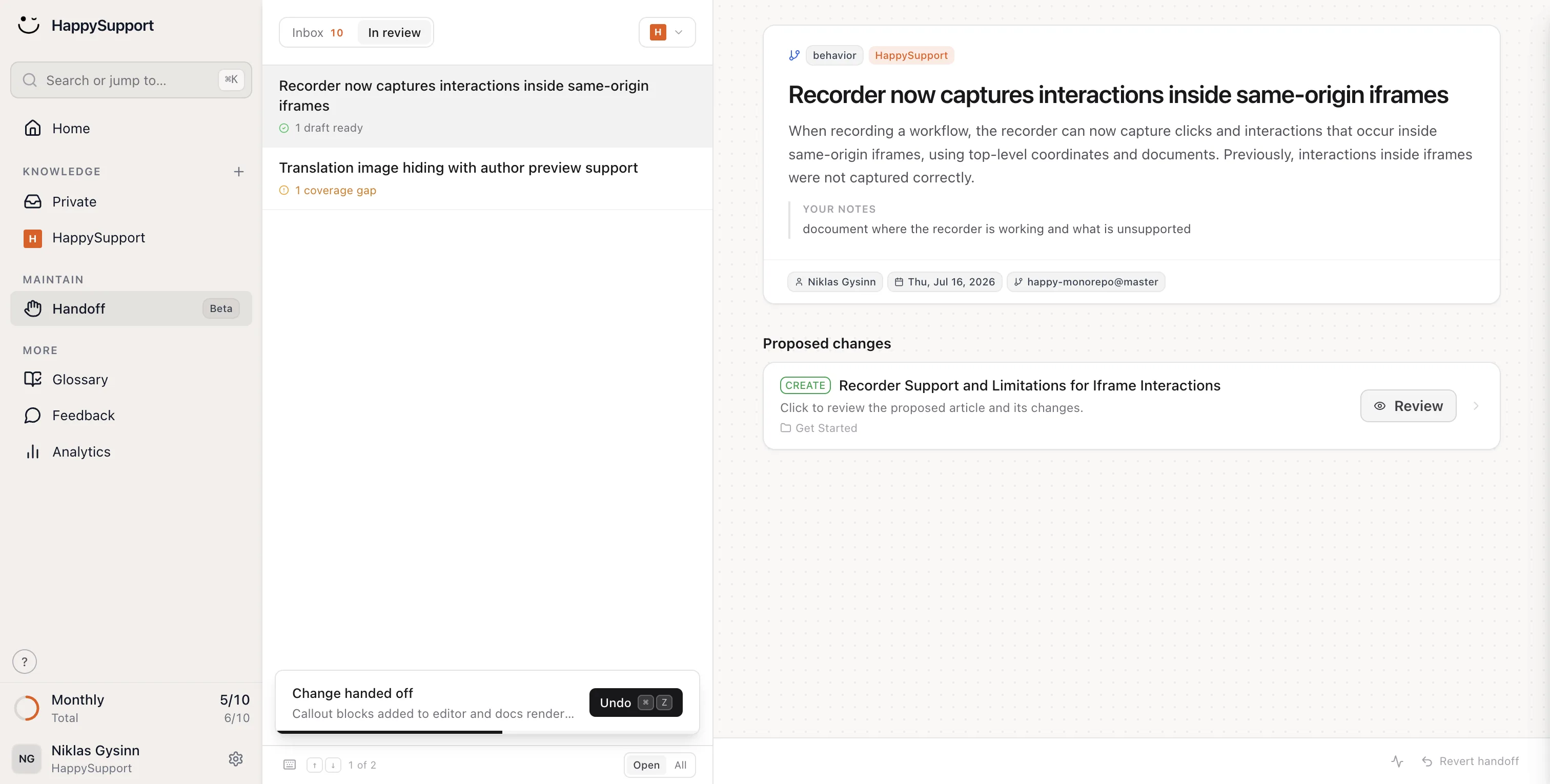
Integration means problems are caught hours after a release rather than weeks after a customer complaint. The goal of a self-updating help center is to make the quarterly audit unnecessary. Not by automating the writing, but by automating the detection of drift.
Tools for help center content audits
Most help center platforms include basic audit tooling. Zendesk Guide and Document360 both surface last-edited dates, article views, and helpfulness ratings in a single dashboard. Help Scout's Docs product shows popular articles and search queries that return no results. For teams that need deeper analysis, Google Analytics with help center tracking provides full traffic data, bounce rates, and session duration per article.
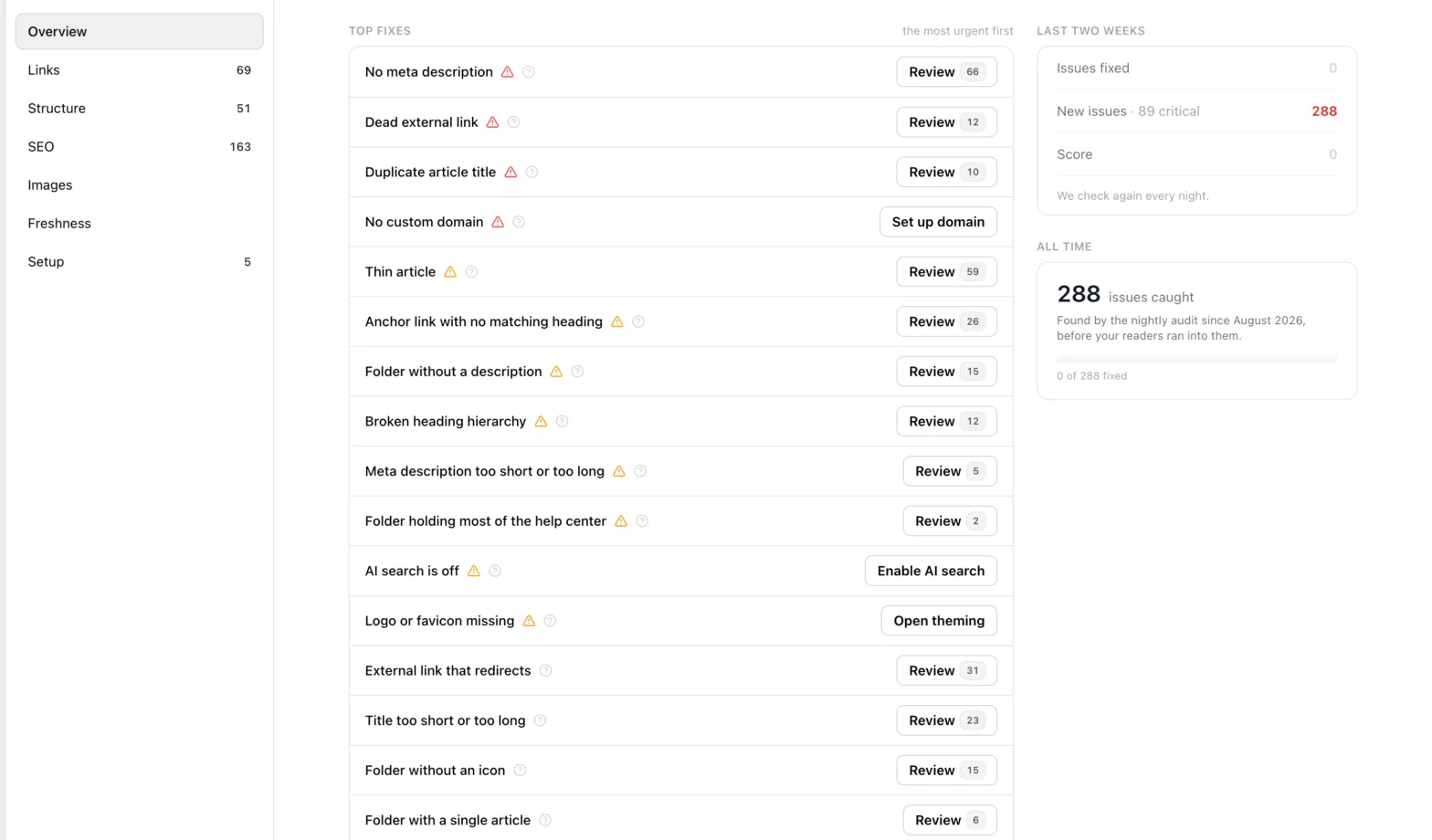
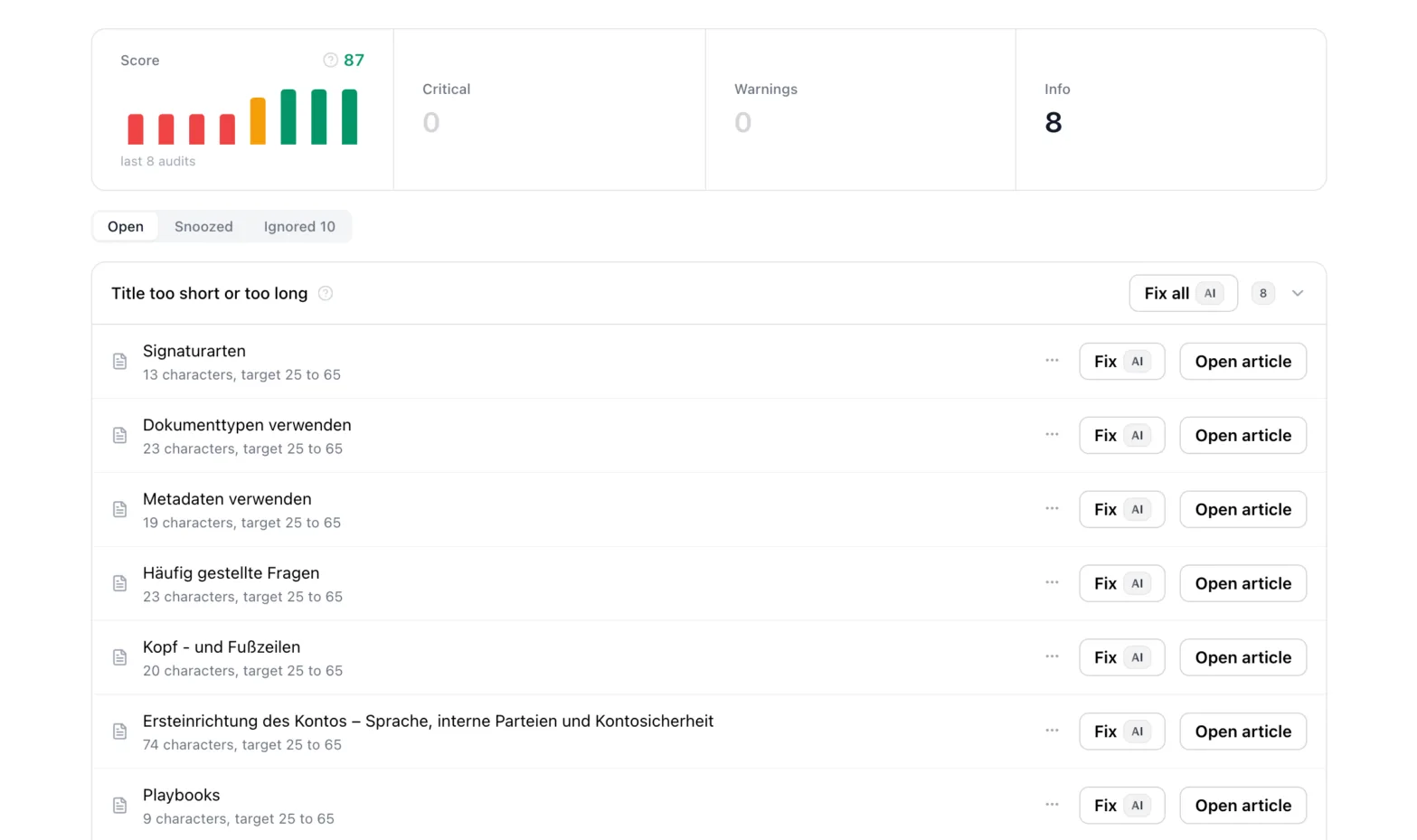
For the cross-reference step, a simple spreadsheet beats any specialized tool. The core audit process is: export article list, export performance data, export 90-day release notes, match by feature name or keyword, flag and prioritize. The tools that make this faster are the ones that reduce manual export steps, not additional platforms. That said, this is starting to change: HappySupport ships an automated documentation audit that runs the whole checklist nightly, from dead links to stale articles, and links each finding to the place where it gets fixed.
The Knowledge-Centered Success methodology from the Consortium for Service Innovation provides a framework for integrating ongoing article review into the support workflow itself. Rather than batch audits, KCS treats every support interaction as an opportunity to flag and improve the knowledge article that should have resolved it. Teams that implement KCS practices report significantly reduced documentation drift because article quality improves continuously through use, not through periodic cleanup.
Building an audit practice that sticks
A help center content audit is not a one-time project. It is a quarterly practice. Teams that run consistent audits maintain higher documentation accuracy, generate fewer avoidable support tickets, and build a stronger foundation for AI-assisted support. AI chatbot accuracy is bounded by knowledge base accuracy, so the audit practice directly affects what AI tools can do for customers.
The minimum sustainable practice: quarterly deep audit using the five-step process above, monthly light review of zero-result searches and helpfulness ratings, and a standing agenda item in each sprint review to flag which product changes affect existing articles. That last step is the highest-leverage addition to any audit practice. It converts the cross-reference step from a quarterly batch exercise into a continuous low-effort habit.
Start with your top 20 articles by traffic. Cross-reference them against your last 90 days of release notes. Fix the ones with active ticket correlations first. Archive what is deprecated. Build coverage gaps into your next content sprint. Then run it again next quarter. Teams that do this consistently spend less time on reactive fixes and more time building the kind of help center that actually reduces ticket volume over time.
 Book a demo