

To keep documentation up to date, tie documentation updates to the release instead of the calendar: find out which articles each change affects, triage them by user impact, and fix the critical ones before the release ships. Everything else in this guide is a way to make those three steps cheap enough to run every week.
This guide covers why documentation falls behind fast-shipping products, a documentation update workflow and release checklist for weekly releases, what engineering has to hand over to support, how agile documentation, continuous documentation and docs as code fit together, what documentation debt and outdated articles cost, and how to update documentation from code changes and measure freshness. Our recommendation for SaaS teams that ship often is HappySupport: it reads your commits and proposes the help articles to update or create, and your team reviews each proposal before anything is published.
Why does documentation fall behind when the product ships every week?
Documentation falls behind because the change happens in one system and the documentation lives in another. A developer renames a menu, merges the pull request, and the release goes out. Nothing in that flow tells the help center owner that step three of a popular article is now wrong, so it stays wrong until someone notices, usually a customer. That is a signal problem, not an effort problem: nobody can fix an article they do not know is broken.
Five ways a single release breaks an article
Each of these needs a different kind of check, which is why one release can break several articles at once:
- Navigation changes. "Settings, then Team" becomes "Organization, then Members". Every article that spells out the old path is now a dead end.
- Renamed buttons and labels. "Export" becomes "Download report". Readers search for the old word, or look for a button that no longer exists.
- Screenshot drift. The UI changes, the picture does not. The reader sees one screen in the article and another in the product, and stops trusting both.
- Reordered or added steps. The old steps are still plausible, so readers follow them and fail halfway through, usually blaming themselves first.
- Removed or merged features. The article now describes something that does not exist. This is the most misleading kind, because it is confidently wrong.
What we found in 44 SaaS help centers
Across 44 SaaS help centers we crawled between 2 August and 15 September 2026 (article age from sitemap last-modified dates, which measures when an article was last changed, not whether it is correct), most help centers were not being updated at the pace their products ship. The method is in what we found auditing 44 SaaS help centers.
135 days
Median article age in the median help center
37.5%
Articles unchanged for six months in the median help center
29 of 44
Help centers that show readers no last-updated date
16 of 44
Help centers with dead links in a 40-article sample
In 15 of the 36 help centers that exposed dates, most articles were older than six months. Age alone does not prove an article is wrong: a stable billing article can be correct for years. But for a product that ships every week, an article untouched for six months has lived through roughly 26 releases, and the odds that none of them touched its screens are low.
Why the backlog compounds
Here is a worked example of our own, with stated assumptions rather than measured data. Assume a team ships 50 releases a year and each release changes three documented screens. That is 150 article reviews a year before anyone writes a single new article. If the help center has 100 articles, every article needs a look one and a half times a year just to stay correct. Most teams review their help center quarterly at best, so the gap grows with every release that goes out without a matching documentation update.
What does a documentation update workflow for weekly releases look like?
A workflow that keeps pace with weekly releases has three parts: detection, triage and update. None of them needs new software to start. The manual version is the right first step, because it shows you where your real bottleneck is.
Detection: know what changed before readers do
Most documentation teams find out about changes from a confused customer or by chance. Detection means the release process produces a list of user-facing changes before or at the moment they ship.
The simplest version is a standing 15-minute check with engineering the day before each release, with one question on the agenda: what changed in the UI this release? The answer becomes a short diff list of changed screens, flows and labels, and that list drives the documentation work for the week.
Triage: not every change needs a documentation update
Treating every UI change as a documentation emergency burns out the person doing it. A simple rubric keeps the work proportional:
- Critical, update before the release ships: new required steps, renamed navigation, renamed primary buttons, removed features that articles still describe.
- Standard, update within a day of release: moved elements on the same screen, new optional settings that extend a documented flow, changed secondary labels.
- Later, next cycle: new features with no existing article (these need a new article, not an update), admin-only settings, small visual changes that leave labels and steps intact.
- No action: backend changes, performance work, anything with no user-facing surface.
Update: make the fix smaller than the problem
The update step is where most teams stall. If fixing an article means recapturing, cropping and re-uploading every screenshot by hand, a release with ten affected articles eats a day. Two things shrink that work: re-recording a flow in one pass instead of rebuilding it image by image, and reviewing for accuracy first and style later. A correct article published with the release beats a polished one published after readers hit the old version.
The documentation release checklist
Keep the checklist where engineering already works, in the issue tracker, not in a separate documentation tool:
- Collect the user-facing changes in this release from the pull requests, the release notes or the pre-release check.
- Map each change to the articles that mention the affected screen, label or flow. Search the help center for the old label, not only the feature name.
- Classify each article as critical, standard, later or no action.
- Assign each article to a named owner for that product area.
- Update critical articles before the release goes live, and publish new-feature articles at the same moment as the feature.
- Update standard articles within a day.
- After release, click through your ten most-visited articles against the live product.
- Watch tickets for two to three days. Any question that shows up more than twice is a documentation gap to log for the next cycle.
The spot check in step 7 is the one teams skip and should defend. The most-visited articles carry most of the reader decisions, so one stale article there costs more than ten stale articles nobody reads.
What should engineering hand over to support before a release?
Most teams do not have a broken product-to-support handoff. They have none at all, only an assumption that product will tell support when something changes. That assumption fails for three structural reasons.
- Timing. Features change until feature freeze. Documentation written earlier gets rewritten; documentation written after launch is late. The useful window is short: from feature freeze to release.
- Knowledge asymmetry. Engineering knows how the feature works. Support knows what users will ask about it. A good article needs both, and without a process they never meet.
- No named recipient. "Support will figure it out" means nobody does. The handoff goes to a person: the support lead, a senior agent or a technical writer.
The four questions every release note for support should answer
Engineering tends to describe what changed technically. Support needs what it means for users. A handoff note answers four questions:
- What changed, in plain language?
- Which users see it: everyone, a plan tier, an account type, a specific configuration?
- What do users need to do differently, if anything?
- Which known edge cases, limitations or open bugs will generate tickets?
Add two lists to that: the existing help articles that mention anything that changed, and the topics that need a new article. Breaking changes, meaning renamed menus, moved settings and changed workflows, should be called out explicitly, not buried in a changelog. If your changelog itself needs work, our comparison of changelog tools covers the options.
Make the release itself the trigger
The step that breaks most often is simple: support does not know when the release happens. Put the documentation owner on the same release notification engineering gets, whether that is a GitHub release tag, a deploy hook or a Slack channel. Stage new-feature articles as drafts and publish them when the release fires.
When the handoff does not happen, and some weeks it will not, support needs a fallback that does not depend on anyone remembering: subscribe to release tags directly, review tickets that mention anything changed in the last 48 hours, and tag tickets caused by documentation gaps. Over a few months those tags show which kinds of releases generate the most support load, which is the evidence you need for the conversation about who owns documentation in a SaaS company.
Agile documentation: what changes in the definition of done?
The Agile Manifesto values "working software over comprehensive documentation", and many teams read that as permission to skip the docs. The authors did not mean that. Jim Highsmith wrote in the manifesto's history: "We embrace documentation, but not hundreds of pages of never-maintained and rarely-used tomes." Agile documentation in that sense is small, current and maintained at the same cadence as the product.
The usual failure is not too little documentation, it is a waterfall workflow inside an agile team: docs written after the sprint, reviewed as a deliverable, published after sign-off. That lag is built in, and at a weekly cadence it adds up release after release.
Put documentation impact into the definition of done
Add one field to every ticket that touches the UI: Documentation impact: none / update required / new article needed. It takes seconds to fill in during planning. A story is not done until the impact has been assessed and, for critical items, handled. This one field turns documentation from a surprise at the end of the sprint into a triaged list that already exists when the sprint ends.
Two practical rules go with it. Write or update the article after the UI is final, triggered by the merge, not at sprint kickoff, because anything written earlier documents a moving target. And do not require engineering sign-off on documentation updates: engineers approve code, and every extra review hop adds days to the lag.
Roles in documentation in agile teams
Distributed ownership beats a single owner, because a single owner turns one person's sick week into a three-release backlog.
- Engineers flag changes. They mark documentation impact on tickets and in pull request descriptions. They do not write the articles.
- A documentation owner per product area keeps that area current after each release. Often a product manager or a senior support agent for that area.
- The support lead is the quality gatekeeper. They review what changed each cycle, escalate critical updates and track freshness. Their job is to know the state of every article, not to write all of them. If that lead is also the only writer, the one-person help center playbook covers how to keep the load manageable.
Continuous documentation, living documentation and docs as code
These three terms overlap, and it helps to separate them.
Continuous documentation is documentation work that is triggered by product changes rather than by a schedule. It borrows the logic of continuous integration: the trigger is a merge or a release, the scope is limited to what changed, and the human effort goes into reviewing and writing, not into finding out what changed. Continuous documentation does not mean a machine writes your help center. It means the trigger is automatic and the queue is scoped.
Living documentation describes the result: documentation that changes with the product instead of being written once and frozen. The Knowledge-Centered Service methodology makes a similar point for support knowledge with its Solve Loop, capturing knowledge while the issue is being solved, and its Evolve Loop, improving that knowledge over time. The principle carries over to product documentation: capture the article when the knowledge is fresh, then let real changes drive revisions.
Where docs as code fits
Docs as code, as Write the Docs defines it, means writing documentation with the same tools as code: issue trackers, version control, plain text markup, code reviews and automated tests. For developer documentation, such as API references and SDK guides that live next to the code, it is the right model: a pull request that changes an endpoint can update its reference page in the same review, and CI can fail the build on a broken link. Our overview of documentation tools for developers covers that side.
Help centers are different. Their writers are often support and customer success people, and their articles describe screens and click paths rather than functions. Moving them into a repository does not solve the core problem anyway: the component change that renames a button does not touch the Markdown file telling readers to click it. What a help center needs from docs as code is the trigger, not the file format: the code change should open a documentation review, wherever the article lives.
Documentation debt vs technical debt
Ward Cunningham coined the technical debt metaphor in 1992, and Martin Fowler's summary puts it simply: the extra effort it takes to add new features is the interest paid on the debt. Documentation debt works the same way. Every release that ships without its documentation update adds principal, and the interest is paid in tickets, repeated explanations and lost trust in the help center.
Documentation debt comes in four forms:
- Missing: a feature shipped and nothing was written.
- Stale: the article was correct when written and the product moved on. This is the largest category in fast-shipping products.
- Wrong: documented incorrectly from the start, often from a spec instead of the live product.
- Orphaned: the feature is gone but the article is still indexed, and search and AI assistants keep surfacing it.
Why documentation debt stays invisible
The difference from technical debt is the signal. Technical debt shows up in failing tests, slow builds and sprint velocity, and engineering culture has rituals for it. Documentation debt has no failing build. An article describing a button that no longer exists renders perfectly. The first alert is a customer who followed it.
That is why paying it down takes two separate moves. First, a one-time catch-up: rank stale articles by the tickets and traffic they cause, fix the top of the list, and time-box the effort. Second, a structural change so the debt does not grow back: the definition of done above, plus a detection step that turns code changes into a review queue. A catch-up sprint without the structural change only resets the balance; at weekly releases it climbs back within months.
What does outdated documentation cost?
The most direct cost is contacts that self-service should have handled. Gartner reported in 2019 that live channels average $8.01 per contact, while self-service costs about $0.10. A wrong article does not deflect a ticket, it delays one: the customer spends time on the help center, fails, and arrives in the queue frustrated.
A cost model you can run with your own numbers
This is our own worked example; replace each assumption with your data.
- Assumption: 300 tickets a month are how-to questions that a correct, current article would have answered.
- Assumption: each costs the Gartner live-channel average of $8.01 instead of $0.10 for self-service.
- Result: 300 × ($8.01 minus $0.10) = $2,373 a month, or $28,476 a year, before counting the hours spent maintaining articles by hand.
To get your own first input, tag tickets for two weeks with a root cause such as "article missing", "article wrong" or "followed the steps and it failed". Multiply the tagged count by your cost per contact.
The costs that do not show up in the ticket report
- AI answers inherit the error. An AI chatbot or in-product assistant that answers from your help center repeats a stale article to every customer who asks, with full confidence. A wrong static article misleads one reader at a time; a wrong article behind a bot misleads at scale. We cover this in why AI chatbots give wrong answers and in the case for a single source of truth for your chatbot.
- Readers stop trying. Customers who hit a wrong article learn to skip the help center and open a ticket first. That habit outlives the fix.
- Your own team routes around the help center. Agents who know an article is wrong write answers from scratch, and the real knowledge moves into Slack threads and senior colleagues' heads.
Why do manual documentation updates break at scale?
The manual workflow above removes the worst failures, but it breaks in predictable ways as the product and the cadence grow.
The single-owner bottleneck. When one person owns every update, one busy release or one holiday puts the queue several releases behind.
Calendar reviews. A quarterly audit finds three months of drift in one pass, after readers have already met it. Monthly reviews shorten the window but still let four releases pile up. The cadence that matches weekly releases is event-based: reviews start when a release lands.
The detection ceiling. A writer can only fix what they know is broken. If the release note says "improvements to the settings page" and the change actually renamed four menu items, nobody can derive the list of stale articles from that note. Reading every article against the live product after every release is not a realistic job.
Screenshot tools optimize the wrong step. Screen recorders that produce screenshot guides make creation fast. Maintenance was always the larger cost, and a screenshot has no connection to the element it shows. Faster creation means more articles, which means more surface to maintain by hand. Why screenshot documentation breaks every release goes into the details.
Does a dedicated documentation team fix it?
A dedicated documentation team has real benefits for a SaaS product: one consistent voice and terminology, someone whose job is structure and findability, articles written from the live product rather than a spec, and a clear owner for quality. What it does not fix on its own is detection. Writers still depend on someone telling them which articles a change affected, so a larger team without a change signal mostly gets better at fixing what customers already reported. Hiring helps most after the detection step exists, when writers can spend their time on judgment work: voice, structure, edge cases and new content.
How do you update documentation from code changes?
The structural fix is to take the detection step from humans and give it to the system that already knows what changed: the code repository. Every user-facing change passes through a commit or a pull request. If the documentation process reads that stream, the list of affected articles exists before the release does, and people spend their time reviewing rather than hunting.
This is how HappySupport's Git Handoff works. Git Handoff reads commits and pull requests from GitHub, GitLab or Bitbucket, groups the changes into topics, finds the help articles a change affects, and proposes updates or new articles. Your team reviews and accepts each proposal before anything is published. It is available on the Professional plan and up, at 399 EUR a month, billed yearly (479 EUR billed monthly), excl. VAT.
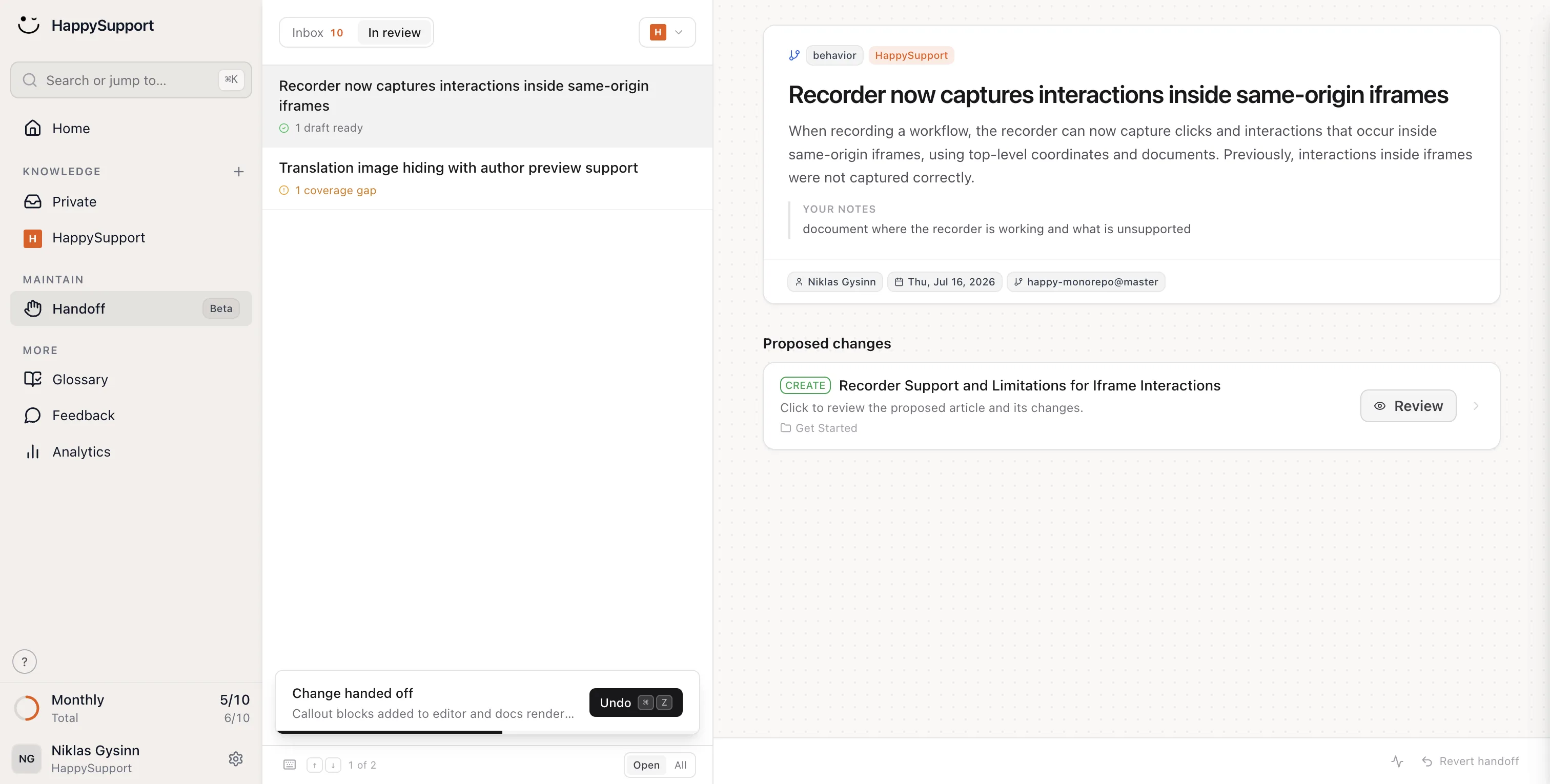
The review step is deliberate. A diff shows that a label changed; it does not always show whether the workflow around it still makes sense to a reader. Proposals for a person to check keep the speed of automation without publishing a guess.
Record guides so they can be checked against the product
The second half is how articles are captured in the first place. The HappyRecorder, a Chrome extension or Windows app, records a click-through as a step-by-step article with screenshots plus the DOM and CSS selectors of each step. Each step is tied to the element it describes rather than only to a picture of it, and when a flow changes, re-recording it is one pass through the product instead of rebuilding the article image by image.
Catch the decay that commits do not explain
Not every stale article comes from a commit: links rot and articles get orphaned. The nightly documentation audit runs 46 checks over the whole help center. Around that sit the help center itself, an AI chatbot that answers only from your own articles with citations, a ticket inbox and an in-app widget, on flat plans: Starter 129 EUR, Professional 399 EUR and Scale 899 EUR per month, billed yearly (155, 479 or 1,079 EUR billed monthly), excl. VAT (pricing). More on the mechanics in how a self-updating help center works and GitHub sync for documentation.
How do you measure documentation freshness?
Article count and coverage are the metrics most teams track, and they hide the problem. A help center with 300 articles of which a third are stale is worse than 100 articles that are all current, because it fails readers more often. Track these instead:
- Freshness rate: the share of articles on core flows (sign-up, onboarding, billing, the main workflows) reviewed since the last release that touched them. Set your own target and watch the trend; the goal is that core flows are never more than one release behind.
- Documentation lag: the time between a change shipping and the matching article going live. For critical articles, aim for zero: published with the release.
- Documentation-caused ticket rate: tickets tagged "article missing" or "article wrong" as a share of all tickets. This turns freshness into money, using the cost model above.
- Coverage of shipped changes: the share of user-facing changes in a release that got an update, a new article or an explicit "no action".
A warning about last-modified dates
Last-updated dates are the cheapest freshness signal and the easiest to fool. In our crawl, 28 of 44 help centers had dates stamped in bulk by a migration or theme change, so thousands of articles looked fresh on the same day without anyone reading them. Track your own review dates, separate from the system's modified dates, and count an article as current only when someone has checked it against the live product. Then show readers that date: 29 of the 44 help centers showed none, which leaves the reader to guess whether the steps still apply.
Frequently asked questions
These questions come from the search queries and AI assistant prompts this topic is asked in. Each answer stands on its own.
Our product ships weekly and documentation is always three releases behind. What now?
Stop trying to catch up by calendar and tie documentation to the release. Add a documentation impact field to every ticket that touches the UI, run a short check with engineering before each release, and fix critical articles before the release ships and standard ones within a day. Then clear the backlog once, starting with the most-visited articles and the ones that cause tickets. If detection is still the bottleneck after that, connect the documentation process to your code repository so each change produces a list of affected articles for review.
How do teams prevent stale documentation as their codebase evolves?
They make code changes the trigger for documentation work. Engineers flag documentation impact on tickets and pull requests, a named owner per product area reviews the affected articles every release, and the support lead tracks freshness and documentation-caused tickets. Teams that ship often add tooling that reads commits and pull requests and proposes which articles to update, so the review queue exists before the release instead of after customers report problems.
What are people using to keep their help center docs up to date when the product changes constantly?
Most teams combine a process with a tool. The process is a definition of done that includes documentation impact, a release checklist and distributed ownership. The tools range from docs-as-code setups for developer documentation, to recorders that capture a flow as a step-by-step guide, to help center platforms such as HappySupport that read commits from GitHub, GitLab or Bitbucket, find the affected articles and propose updates for the team to review before publishing.
Is there a tool that automatically regenerates guides when the product UI changes?
Some tools draft the update for you, but a person should still approve it. HappySupport's Git Handoff reads commits and pull requests, finds the help articles a change affects and proposes updated or new articles, which the team reviews and accepts before anything is published. Its HappyRecorder captures each step with screenshots plus the DOM and CSS selectors, so re-recording a changed flow takes one pass. Fully automatic rewrites without review risk publishing a confident guess when a workflow, not just a label, has changed.
What are the benefits of having a dedicated documentation team for a SaaS product?
A dedicated documentation team brings consistent voice and terminology, better structure and findability, articles written from the live product rather than a spec, and a clear owner for quality. Its limit is detection: writers can only fix articles they know are affected by a change. A documentation team is most effective when engineering flags changes or a tool turns code changes into a review queue, so the writers spend their time on judgment work instead of hunting for what broke.
What is the difference between documentation debt and technical debt?
Technical debt is the extra cost of future changes caused by shortcuts in code; documentation debt is the gap between what the product does and what its documentation says. Both compound with every release. The difference is visibility: technical debt shows up in failing tests and slower delivery, while documentation debt raises no alert until a customer follows a wrong article. Documentation debt comes as missing, stale, wrong or orphaned articles, and stale articles are the largest share in products that ship often.
 Book a demo